Socrative student login: the room name, no password, and why the room is not found
2026-10-24
This post contains affiliate links. As an Amazon Associate, ZAGO.TO earns from qualifying purchases.
The quiz is on the board, the teacher says "go to Socrative", and a student raises a hand. "It wants a room name. What is the password?"
Socrative student login is simpler than most sign-in screens, which is exactly why it confuses people. There is one box, it wants a room name, and there is no password.
Here is what to type, why there is no password, the four reasons a room comes back as not found, and how to get the room name to a class where half the devices are not signed in to anything.
1. Socrative student login: where the room name goes
▲ One box, one word. The room name is the teacher's, not the student's
- Open socrative.com in any browser and tap Student Login, or open the Socrative Student app
- Type the room name the teacher gave. It is one word, letters and numbers, and capitals do not matter
- Tap Join. If the teacher turned on names, a second box asks for the student's name. Type it the way the teacher wants it, since that is how answers get graded
- Wait. If nothing is running, the screen says it is waiting for the teacher to start an activity. That is normal, not an error
The room name belongs to the teacher's account. Every student in that class types the same one.
2. Why there is no password
Students do not have Socrative accounts. The teacher does. The room name is the only key, and it works because the teacher decides when the room is live and what is running in it.
That is also why "socrative student login room name and password" has no answer. There is no student password to find.
If the screen asks for an email and a password, you are on the teacher login page. Go back and choose Student.
A few other classroom joins work the same way, with a code and no account.
Kahoot's game PIN and the Gimkit join code are the same idea with different words.
3. Room not found: four reasons
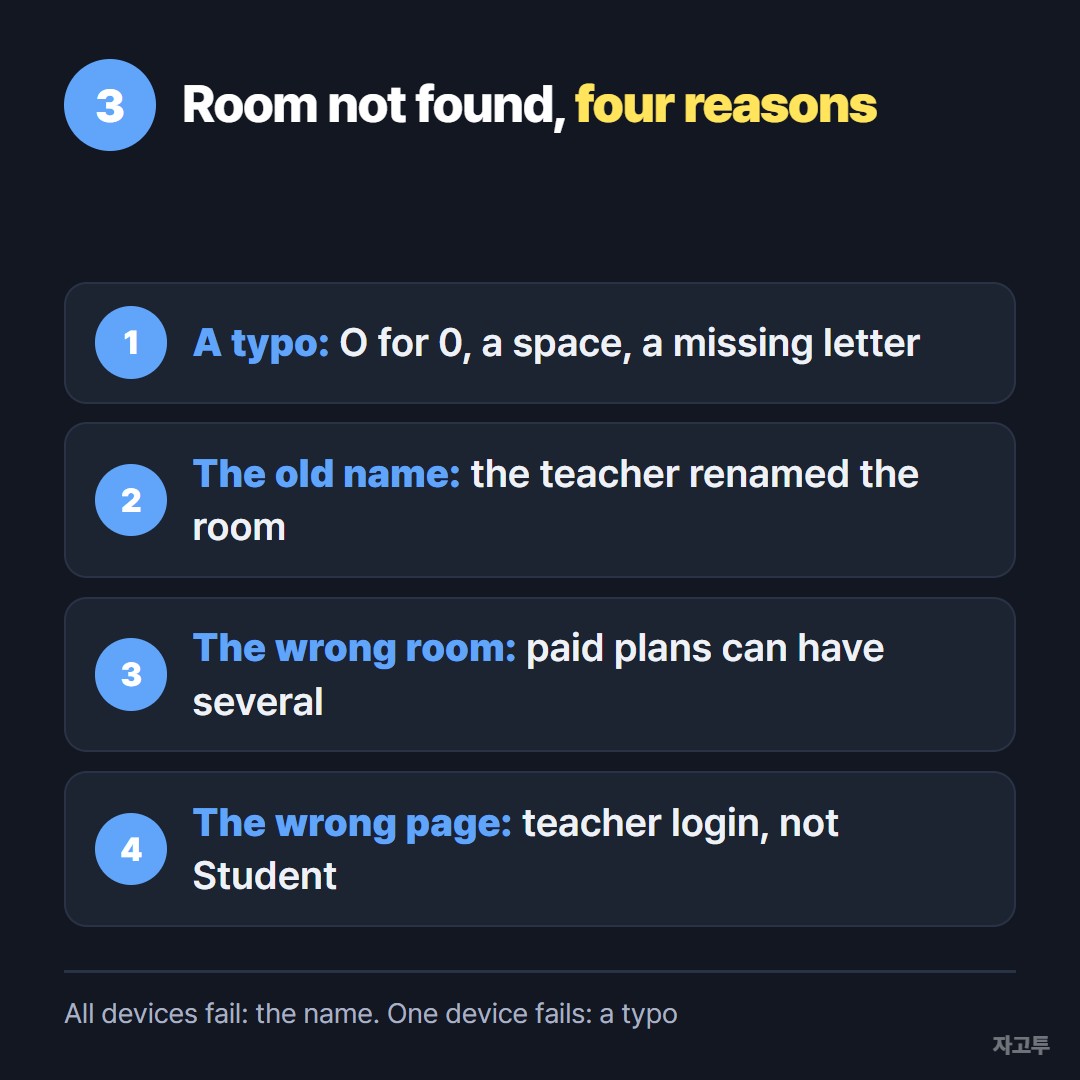
▲ Check these in order. The first two cover most mornings
- A typo. Room names are often two words squashed together, MSJONES3 or ROOM2B. An O for a 0, a space in the middle, or a missing letter is enough
- The old room name. Teachers can rename a room. If the name on the wall is from last term and the teacher changed it, every device fails together
- The wrong room. Teachers on a paid plan can have several rooms. The quiz is running in one of them and the student is typing the name of another
- The wrong page. The student is on the teacher login, or on a lookalike site. Check that the address bar says socrative.com
If all twenty-four devices fail at once, it is the name, not the devices. If one device fails, it is a typo on that device.
Rooms do not expire the way a Kahoot PIN does. A room with nothing running still exists, so an old name from a renamed room is the usual culprit, not an expired one.
4. Getting the room name to every device
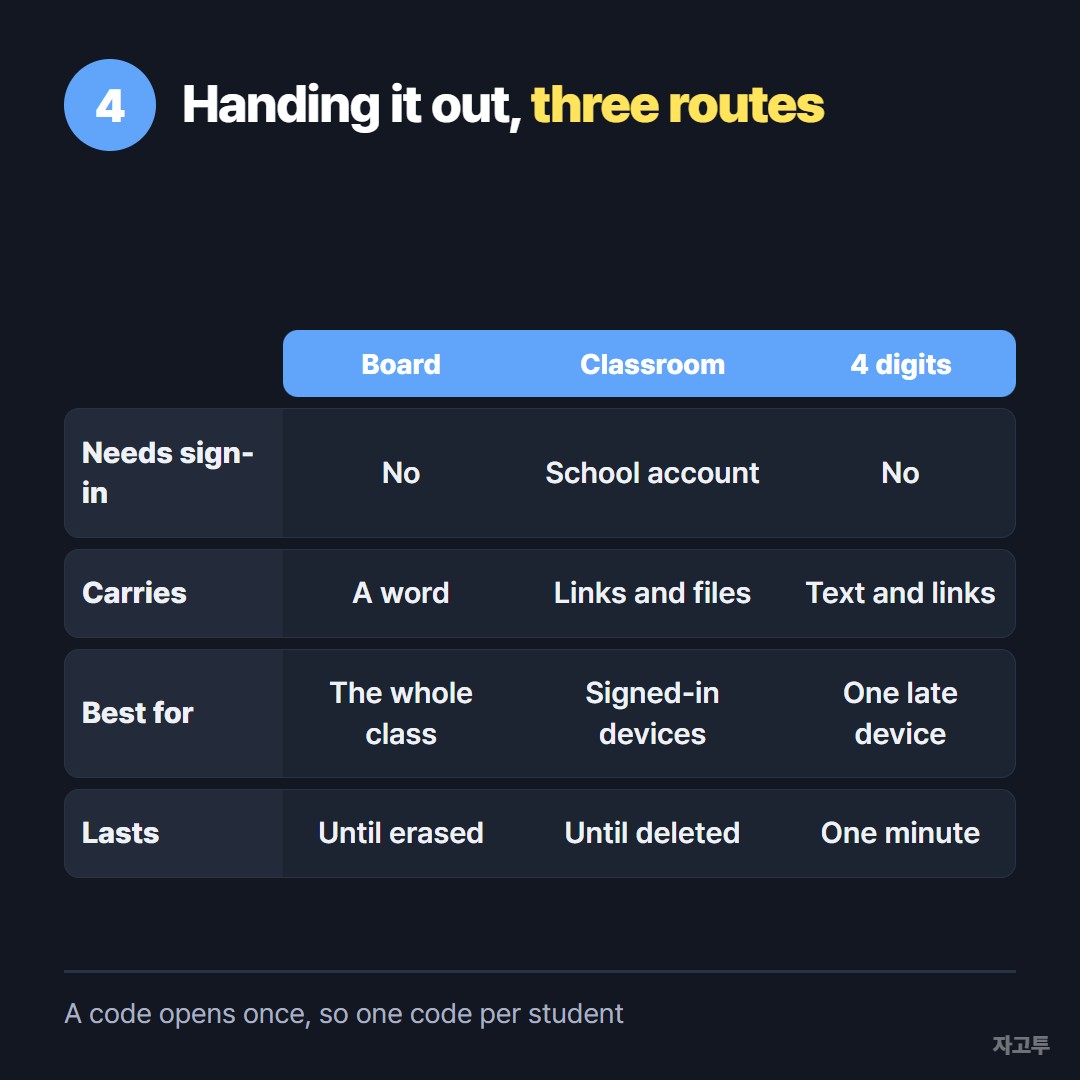
▲ The board works for a word. The links that come with the quiz need another route
A short room name travels well. Write it on the board, say it twice, and the class is in.
The awkward class is the mixed one. Half the students sit at school Chromebooks locked to the school account. The other half brought their own phones and have not signed in to anything.
Google Classroom reaches the first half. The phones cannot open Classroom without a sign-in, and some of those students cannot or will not.
For Socrative itself, the name on the board is enough for them too.
What stalls the lesson is the rest of the packet: the reading link, the long address of the follow-up form, three sites to open afterwards.
Spelling those out loud takes minutes and still produces typos.
ZAGO.TO is a way to put that text on a phone that has no account. Paste the room name and the links at zago.to on the teacher's laptop.
The page answers with a 4-digit code, 1234 for instance, and the student types it at zago.to on the phone. The text shows up with the links clickable.
The code only grows to five digits when every four-digit one is in use.
One code opens once. It is deleted one minute after it is opened, or one minute after sending if nobody opens it.
So this suits the one late student at the back, not twenty-four at once. For the whole room, the board or Classroom still wins.
Two more limits. ZAGO.TO moves text only, up to 10,000 characters, so a worksheet file stays where it is.
And there is no in-browser encryption yet. The server can read the text for that minute, which is fine for a room name and a reading link, and not fine for a password to a graded system.
The board, the projector and the QR code for a mixed class are compared in How to share a link with students when half the class is not logged in.
5. Quick answers
Do students need an account? No. A room name and, if the teacher asks, a name.
Is the room name case sensitive? No. msjones3 and MSJONES3 open the same room.
Can a student join from a phone? Yes, in the browser at socrative.com or in the Socrative Student app.
The student joined but sees nothing. The teacher has not started an activity yet. The screen updates on its own when one launches.
Can two classes use the same room at once? Everyone who types that name lands in the same room, so the teacher runs one class at a time or uses separate rooms.
 Days until Christmas
 Word Counter
 Age Calculator
 Wheel Spinner