Word count in Google Docs: the shortcut, the phone menu, and why Word gives a different number
2026-10-27
This post contains affiliate links. As an Amazon Associate, ZAGO.TO earns from qualifying purchases.

Ctrl+Shift+C on Windows. Cmd+Shift+C on a Mac.
That is the fastest way to see the word count in Google Docs, and for most people it is all they need.
The trouble starts when the number in Docs does not match the number your teacher, editor or submission portal sees.
This guide covers the shortcut, the live counter, the phone and iPad menus, and the handful of reasons two tools give two totals for the same text.
1. Three ways to open the word count on a computer
- Keyboard: Ctrl+Shift+C (Windows, ChromeOS) or Cmd+Shift+C (Mac). A small box opens with pages, words, characters and characters excluding spaces
- Menu: Tools, then Word count. Same box, useful when the shortcut is taken by a browser extension
- Live counter: in that box, tick "Display word count while typing." A counter now sits in the bottom left corner and updates as you write
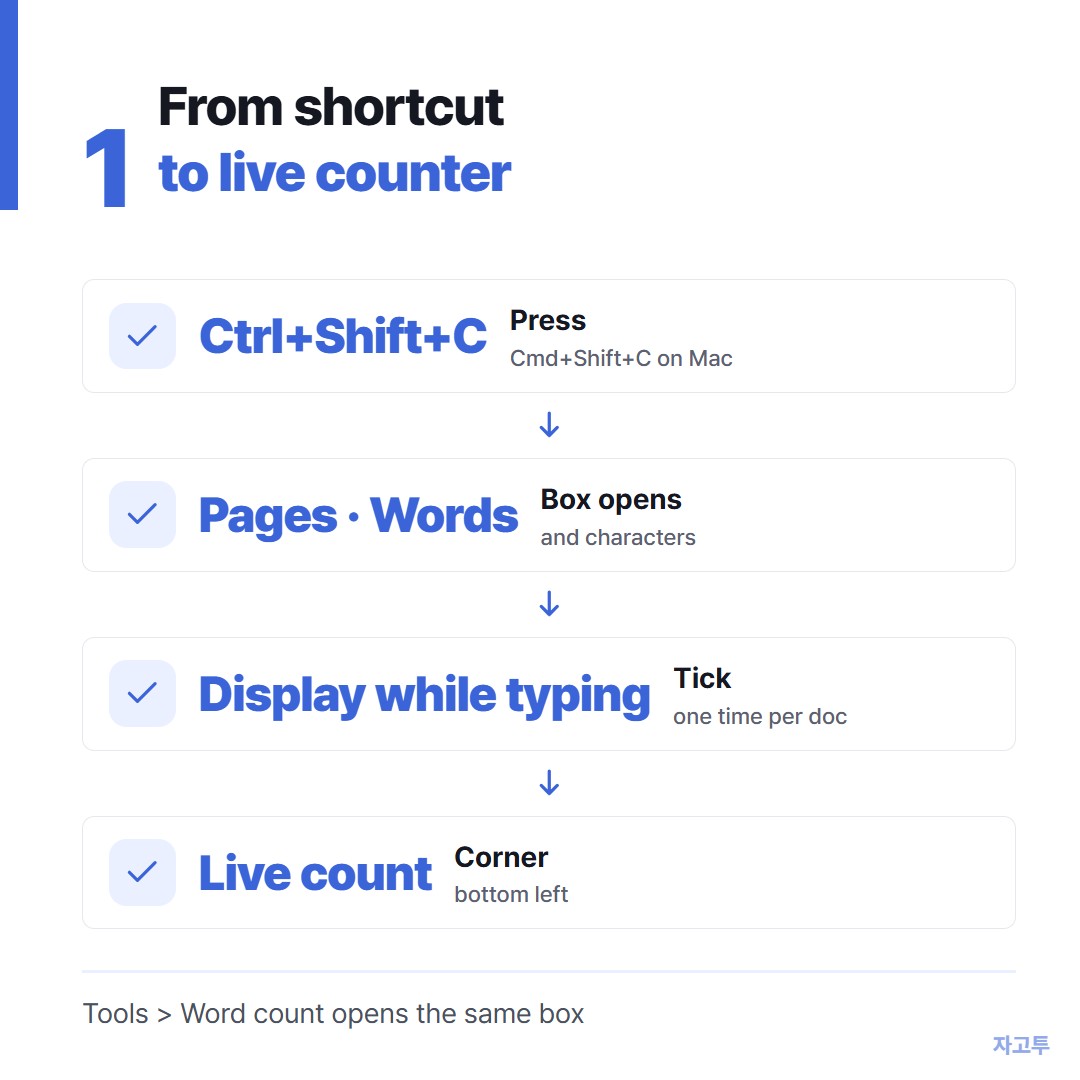
▲ The live counter is one tick box away, and it stays on for that document
The live counter is the one most people miss.
If you are writing toward a limit, it saves you from opening the box every few minutes. The small arrow on the counter switches it between words, characters and pages.
2. Counting one section, not the whole document
Select a paragraph, then press the shortcut. The box now says something like "112 of 1,486 words." The first number is your selection, the second is the full document.
This is how you check a single answer on a multi-question application, or the abstract at the top of a paper.
With the live counter turned on, the selection count shows in the corner too, so you can drag across a section and read the number without opening anything.
3. Word count on the Google Docs app for phone and iPad
The mobile apps hide it one menu deeper.
- Open the document in the Google Docs app
- Tap the three dots in the top right corner
- Tap Word count

▲ On a phone the count lives behind the three dot menu, not in a shortcut
On an iPad with a keyboard attached, Cmd+Shift+C usually works as well. If it does not, use the three dot menu the same way. There is no live counter in the mobile apps, so you open the box each time.
4. Why Google Docs and Word disagree
Paste the same essay into Docs and Microsoft Word and the totals often differ by a few words. Neither is broken. They are counting slightly different things.
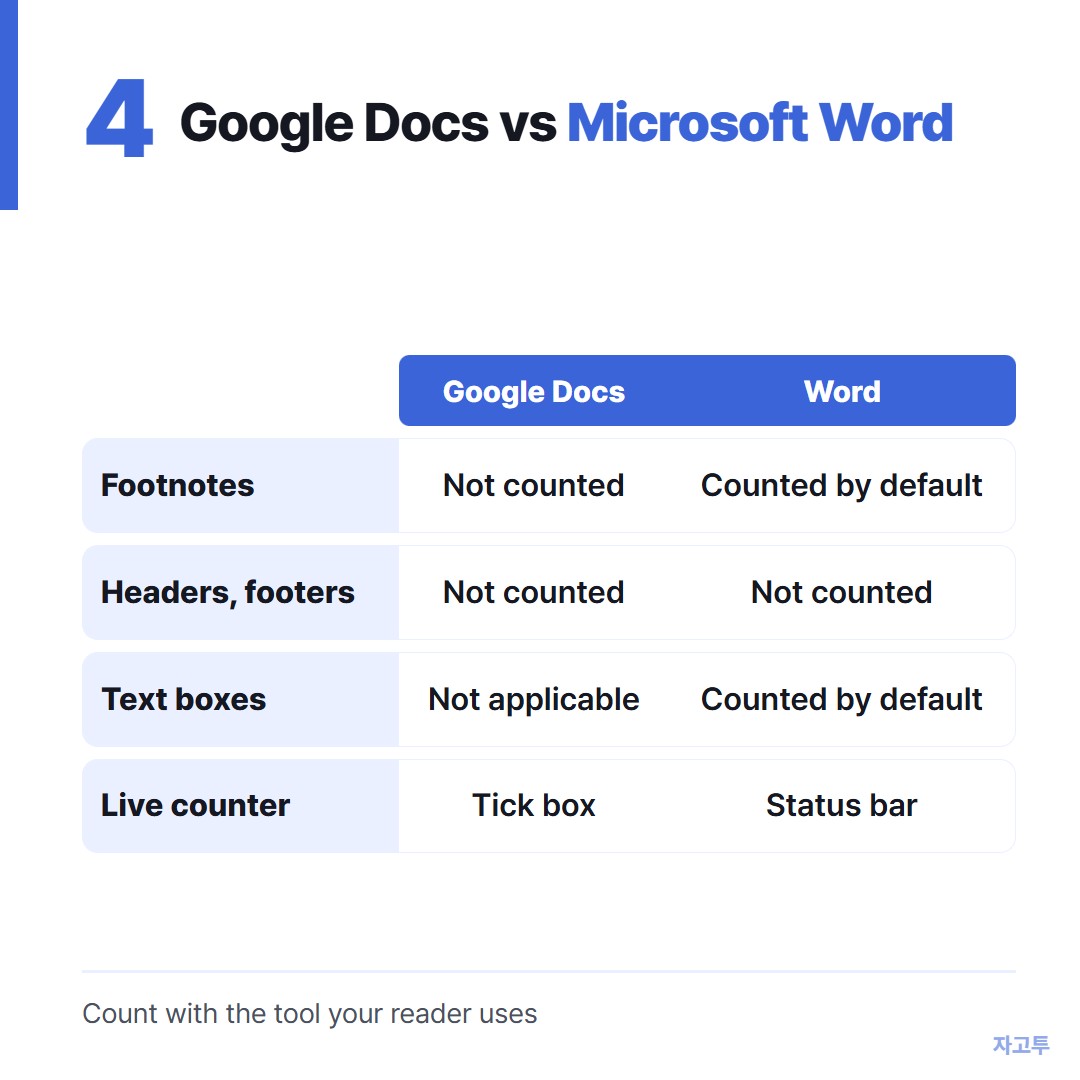
▲ Most of the gap comes from footnotes, text boxes and how each tool splits punctuation
- Footnotes, headers and footers: Docs leaves them out of the count. Word includes text boxes, footnotes and endnotes by default, with a check box to turn that off
- Dashes and slashes: "before—after" or "and/or" can count as one word in one tool and two in another
- Numbers and symbols: a lone "&" or "#" is a character, not a word, in Docs
- Comments: text in comment threads sits outside the document body and is not part of the count
If a limit matters, count with the same tool the reader will use.
A portal that counts on its own does not care what Docs said.
For a deeper look at what each tool treats as a word, see what counts as a word, and why tools disagree.
5. Checking a draft outside Docs
Sometimes you want a second opinion before you paste into a form, or you are writing somewhere with no counter at all, like an email or a plain text box.
ZAGO.TO has a free Word Counter that shows words, characters with and without spaces, sentences, paragraphs and reading time as you paste.
It has quick goal buttons for 250, 500, 650, 1,000 and 2,000 words. It keeps your text on that device only and does not read Google Docs files directly, so you copy and paste the text in.
It will not match every portal to the word either. Use it to catch a draft that is fifty words over, then confirm the final number where you submit.
If you are working on a college essay, the Common App word limit guide walks through that exact gap.
Quick answers
Does Google Docs count words in tables? Yes. Text inside a table in the body is counted like any other text.
Can I see word count without the menu every time? Yes. Turn on "Display word count while typing" once, and the counter stays in that document.
Is there a word count for Google Slides? No built-in one. Copy the slide text into a Doc or a word counter to check it.
Other tools: Days Until · QR Code Generator
 Days until Christmas
 Word Counter
 Age Calculator
 Wheel Spinner