Word counter: what counts as a word, and why tools disagree
2026-10-25
This post contains affiliate links. As an Amazon Associate, ZAGO.TO earns from qualifying purchases.
Paste the same paragraph into Microsoft Word, Google Docs and an online word counter, and you can get three different numbers.
So which one does your teacher, editor or application portal actually mean?
A word counter looks like the simplest tool on the internet. It is not.
Every counter has to decide what a "word" is, and those decisions split on hyphens, dashes, numbers, links and stray symbols.
On a 650-word essay the gap is usually small. On a 250-word abstract with a hard cutoff, five words can be the difference between submitting and trimming.
1. The rule every counter starts from
Almost every tool begins with the same idea: a word is a run of characters with a space on each side. Microsoft Word sticks closest to that. If there is no space, it is one word, whatever is inside.
The trouble starts with the characters that sit between letters without a space:
- Hyphens: is "well-known" one word or two?
- Slashes: is "and/or" one word or two?
- Apostrophes: is "don't" one word or two?
- Numbers: is "9:30" or "$1,000" a word at all?
- Links: is a web address one word, or one per piece?
- Lone symbols: does a spaced "&" or "-" count?
Each tool answers these a little differently, and almost none of them publish a full rulebook. That is why the same text gives different totals.
▲ The same draft, two tools, two numbers
2. Six cases where counts split
Here is how the main approaches tend to treat the tricky cases. Word follows the space rule. The ZAGO.TO counter follows a letter-and-number rule, which we can describe exactly because we wrote it.
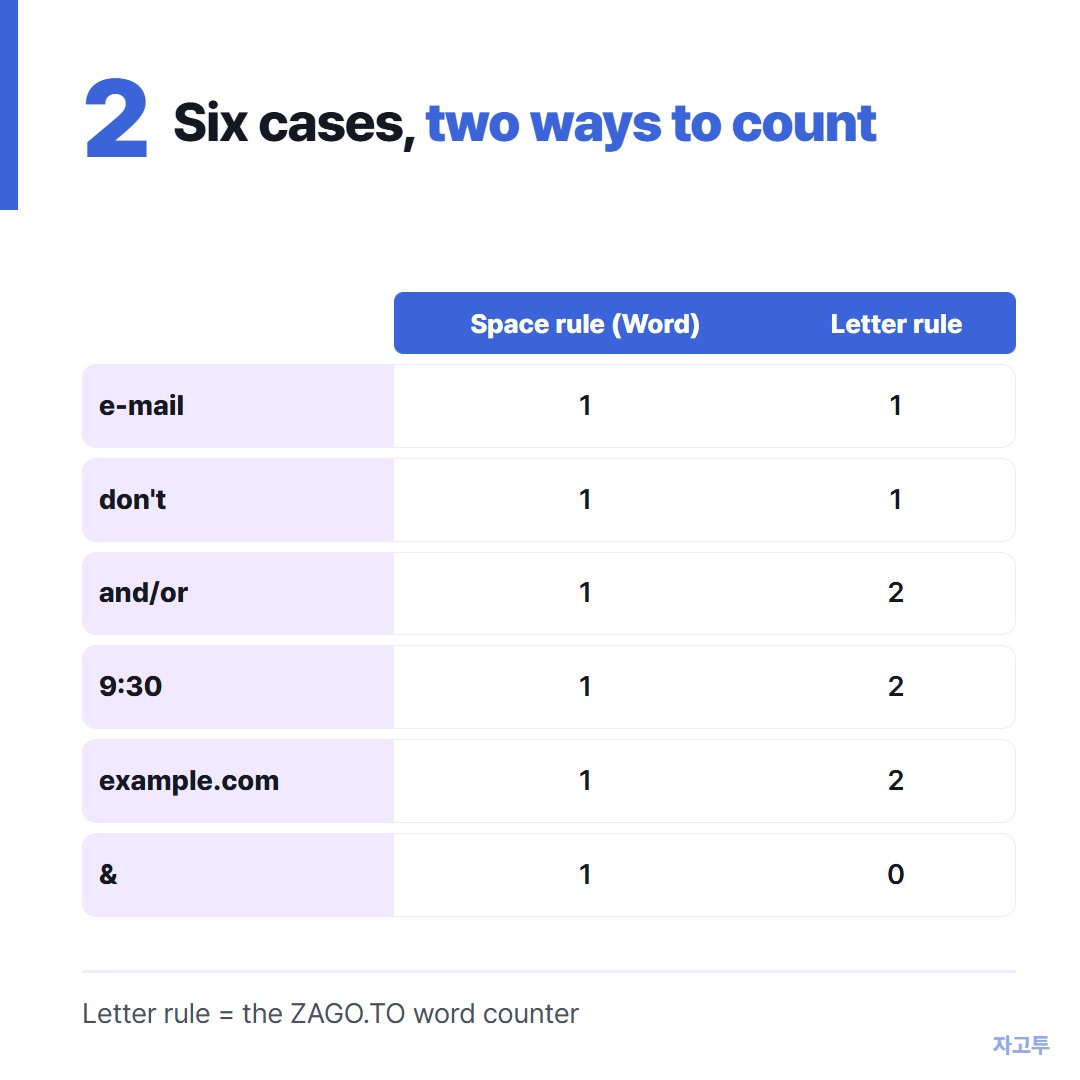
▲ Hyphens and apostrophes rarely cause trouble. Numbers and links do
- Hyphenated words like "e-mail" and "self-aware" count as one word in both.
- Contractions like "don't" and "it's" count as one word in both.
- Slashes and long dashes with no spaces like "and/or" count as one word in Word, because there is no space. A letter-based counter sees two words.
- Numbers with punctuation like "9:30" or "$1,000" count as one word in Word. A letter-based counter splits them at the colon or comma and sees two.
- Web addresses count as one word in Word. A letter-based counter sees each piece between dots and slashes.
- A lone symbol with spaces around it, like " & ", counts as a word in Word. A letter-based counter ignores it.
Google Docs uses its own rules, and they are not documented in detail.
In practice it tends to split at some punctuation that Word ignores. If your work will be judged inside Google Docs, check the final count there and nowhere else.
3. One sentence, two very different counts
Take this deliberately messy sentence:
The well-known e-mail/text, sent at 9:30 a.m., cost $1,000 (see example.com).
Word counts 11. It sees eleven runs between spaces: "The", "well-known", "e-mail/text,", "sent", "at", "9:30", "a.m.,", "cost", "$1,000", "(see" and "example.com).".
A letter-based counter counts 16. It sees "The", "well-known", "e-mail", "text", "sent", "at", "9", "30", "a", "m", "cost", "1", "000", "see", "example" and "com", and drops only the symbols.
Hyphenated words survive as one. Everything else breaks apart.
Normal prose almost never looks like this.
In an ordinary essay paragraph, the two methods usually agree within one or two words per hundred.
The gap grows only when a text is full of times, prices, statistics or links, which is exactly what lab reports and business writing look like.
4. When the difference actually matters
Most limits are soft. A few are not, and those are the ones to check carefully.
- College application essays: the Common App personal essay caps at 650 words, and the box simply stops accepting text past that point. The portal's own count is the one that matters.
- Abstracts: journals and conferences often cap abstracts at 150 to 300 words, and some submission systems reject anything over.
- Class assignments: a "1,000-word essay" usually has some tolerance, often around 10 percent, but only the instructions can tell you that.
- Paid writing and translation: when you bill per word, agree on which tool is the counter of record before the job starts.
A simple habit covers almost all of these. Write in whatever tool you like, but do your final count in the same place your reader or grader will count.
If a long draft is too big to paste into a message at all, that is a different limit with different rules.
We covered it in Sending long text online when a message is too long.
5. Checking a draft quickly
For drafts that live outside a word processor, such as a form box, a chat message or a caption, a browser counter is the fastest check.
ZAGO.TO has a free word counter with no sign-up. Paste or type, and it shows:
- words, characters with and without spaces, sentences and paragraphs
- reading time at 238 words per minute and speaking time at 150
- a limit bar for 250, 500, 650, 1,000 or 2,000 words, or 280 characters, plus a custom number
- up to eight separate drafts, saved in your browser on that device
What it does not do is just as useful to know.
It follows the letter-based rule above, so times, prices and decimals count as more than one word, and a link counts once per piece.
Drafts are saved only in that browser, so they will not appear on your other devices, and clearing site data removes them.
If your limit is enforced by Word or a portal, treat our number as a quick check and confirm the final count there.
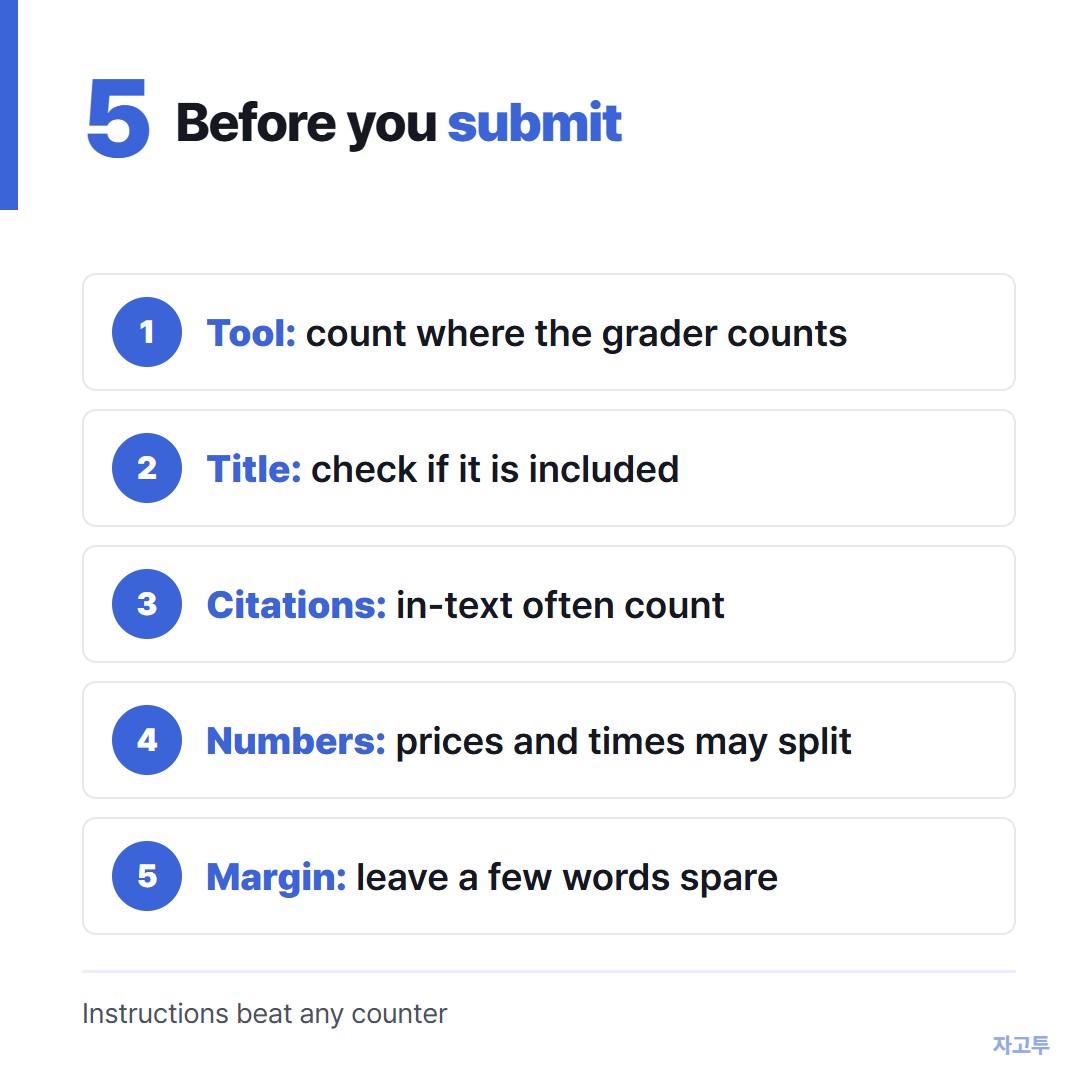
▲ Final count in the grader's tool, every time
6. Questions people ask
Does word count include hyphenated words? Yes, almost always as one word. "Mother-in-law" is one word in Word and in letter-based counters alike.
Do numbers count as words? In Word, yes. Each number between spaces is one word, including "2026" and "$1,000". Letter-based counters count numbers too but may split them at commas, colons and decimal points.
Does the title count toward the word limit? It depends on the instructions. Many teachers exclude the title, headings and reference list, but count in-text citations. When the instructions say nothing, ask once rather than guess.
Why is my Google Docs count different from Word? Each uses its own rules for punctuation between letters. The difference is usually small on plain prose and larger on text full of slashes, numbers and links.
To check your next draft, open the word counter and paste it in.
Other tools: Age Calculator · Days Until
 Days until Christmas
 Word Counter
 Age Calculator
 Wheel Spinner