QR code for a restaurant menu: free, no subscription, and where it goes on the table
2026-10-29
This post contains affiliate links. As an Amazon Associate, ZAGO.TO earns from qualifying purchases.

Does a QR code for a restaurant menu have to cost money? Search it and the first pages are menu platforms with monthly plans, ordering systems and a free trial.
You can skip all of that if you already have the menu somewhere online. The code itself is free.
What you pay those platforms for is hosting the menu, editing it in their dashboard, and sometimes taking orders.
This post walks through the free route, how big to print it, and the one rule that keeps the code working for years.
Step 1: put the menu at one address you control
The QR code only holds an address. So the real work is giving the menu a stable home.
- A page on your own website, like yoursite.com/menu. Best option if you have a site
- A PDF in a shared folder from Google Drive or Dropbox, set so anyone with the link can view
- Your Google Business Profile menu, if you keep it up to date
Pick the address you are least likely to delete. That matters more than which one looks nicest.
For PDFs, check the file on a phone first. A menu laid out for A3 paper turns into tiny text that guests have to pinch and zoom.
One column, large type, and prices next to the dish names read far better.

▲ The code sits on the table; the menu lives at an address you control
Step 2: make the QR code for your restaurant menu
Paste that address into a static QR generator. "Static" means the address goes straight into the pattern, with no middle service that can expire.
The QR Code Generator on ZAGO.TO does this free with no sign-up, and lets you download PNG or SVG.
Use SVG for print. It stays sharp at any size, so the printer will not blur the small squares.
Unsure about static versus dynamic?
Free QR code generator, no expiration explains why some printed codes stop working after a trial ends.
Before you print 40 table cards, print one. Scan it with an iPhone and an Android phone, from where a seated guest would hold it.
Step 3: size and placement on the table
A common rule of thumb is that a QR code should be at least one tenth of the scanning distance. Guests at a table scan from about 30 to 50 cm away.
| Where it goes | Scan distance | Code size | | --- | --- | --- | | Table tent or stand | 30 to 50 cm | 4 to 5 cm | | Sticker on the table | 30 to 40 cm | 3 to 4 cm | | Window or counter sign | 1 to 2 m | 10 to 20 cm |
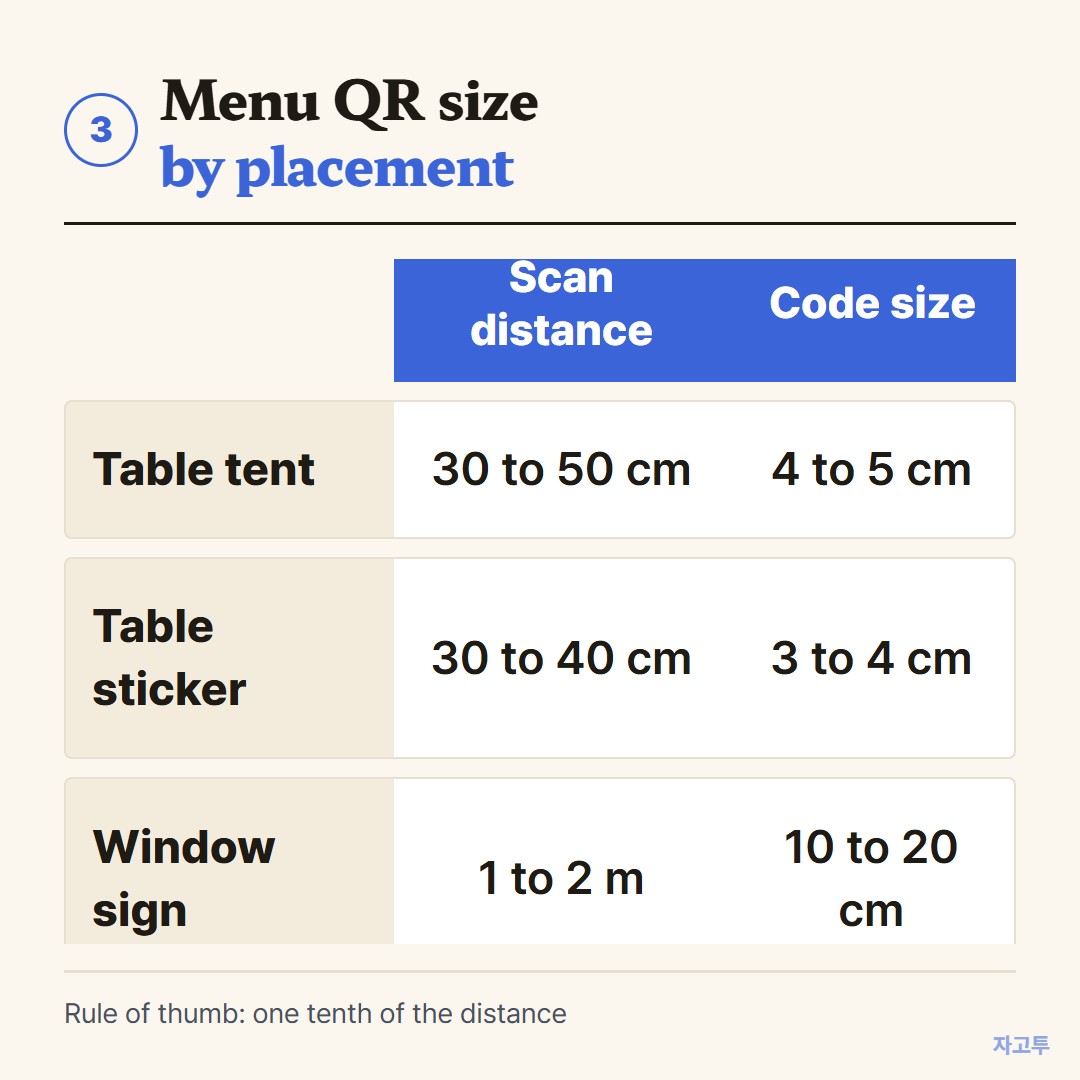
▲ Bigger is fine; too small is the usual reason a code fails
A few placement habits help too:
- Away from glare. Glossy laminate under a ceiling light reflects straight into the camera
- Upright, not flat. A tent card is easier to scan than a sticker under a plate
- Short line of text. "Scan for menu" next to the code tells people what it is
The rule that keeps it working: change the page, not the code
When prices change, edit the page or replace the PDF at the same link. Do not make a new code.
With Google Drive, use "Manage versions" to upload the new file under the same link. If you upload a new file instead, the link changes and every printed code still points to the old menu.
The same goes for website pages. Renaming yoursite.com/menu to yoursite.com/food-menu breaks the codes on every table.
Detail on that kind of mistake is in QR code for website links.
What a free static code cannot do
ZAGO.TO's codes do not count scans, and you cannot point a printed code at a different address later. There is no ordering or payment either.
If you want scan numbers or table ordering, a paid menu platform is the right tool, and the monthly fee buys real features.
Keep a few paper menus anyway. Some guests have a dead battery, a cracked camera or simply prefer paper.
Quick checklist
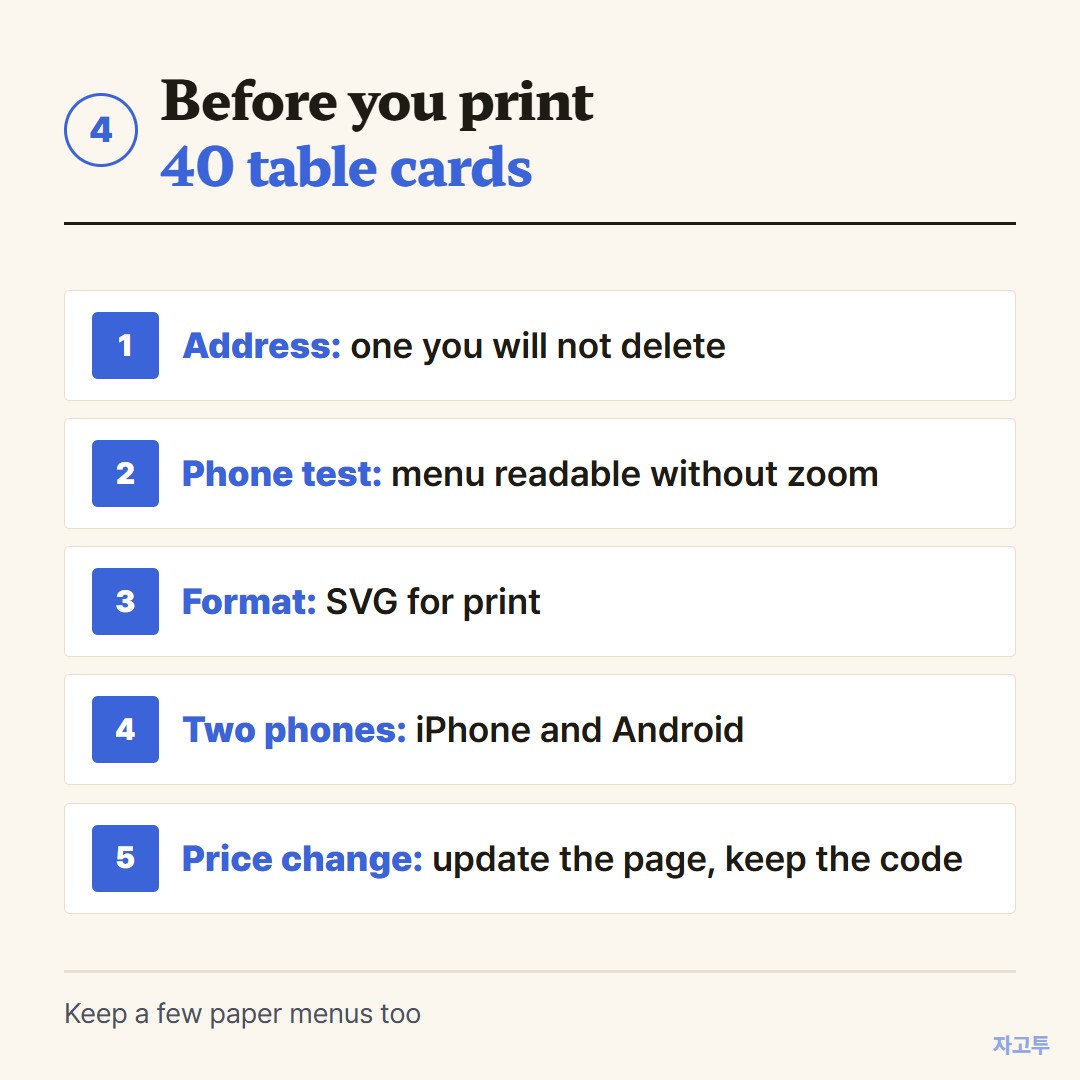
▲ Five checks before the print run
- Menu at one stable address, readable on a phone
- Static code, downloaded as SVG
- 4 to 5 cm on a table tent, tested on two phones
- Update the page, never reprint the code for a price change
Make yours in the QR Code Generator.
Other tools: Word Counter · Wheel Spinner
 Days until Christmas
 Word Counter
 Age Calculator
 Wheel Spinner