QR code for Instagram: the app's own card, or a printable one for menus and stickers
2026-10-29
This post contains affiliate links. As an Amazon Associate, ZAGO.TO earns from qualifying purchases.
Instagram already makes a QR code for Instagram profiles, and for a lot of people that is all they need.
Open your profile, tap Share profile, and the code is right there. Someone in front of you scans it, your page opens, done.
The trouble starts when the code has to leave the phone.
A sticker on a market stall, a line on a printed menu, a business card, a poster that should open one post instead of your whole grid. That is where a plain printable code does a better job.
1. Use Instagram's own code when you are face to face
On current versions of the app, the button sits under your bio.
- Open your profile and tap Share profile.
- The QR card appears. Tap the top of the card to switch the style: color, emoji or a selfie behind the code.
- Tap Download to save it to your photos, or Copy link to get the plain profile address.
On some older versions the same card lives in the menu (the three lines at the top right) under QR code.
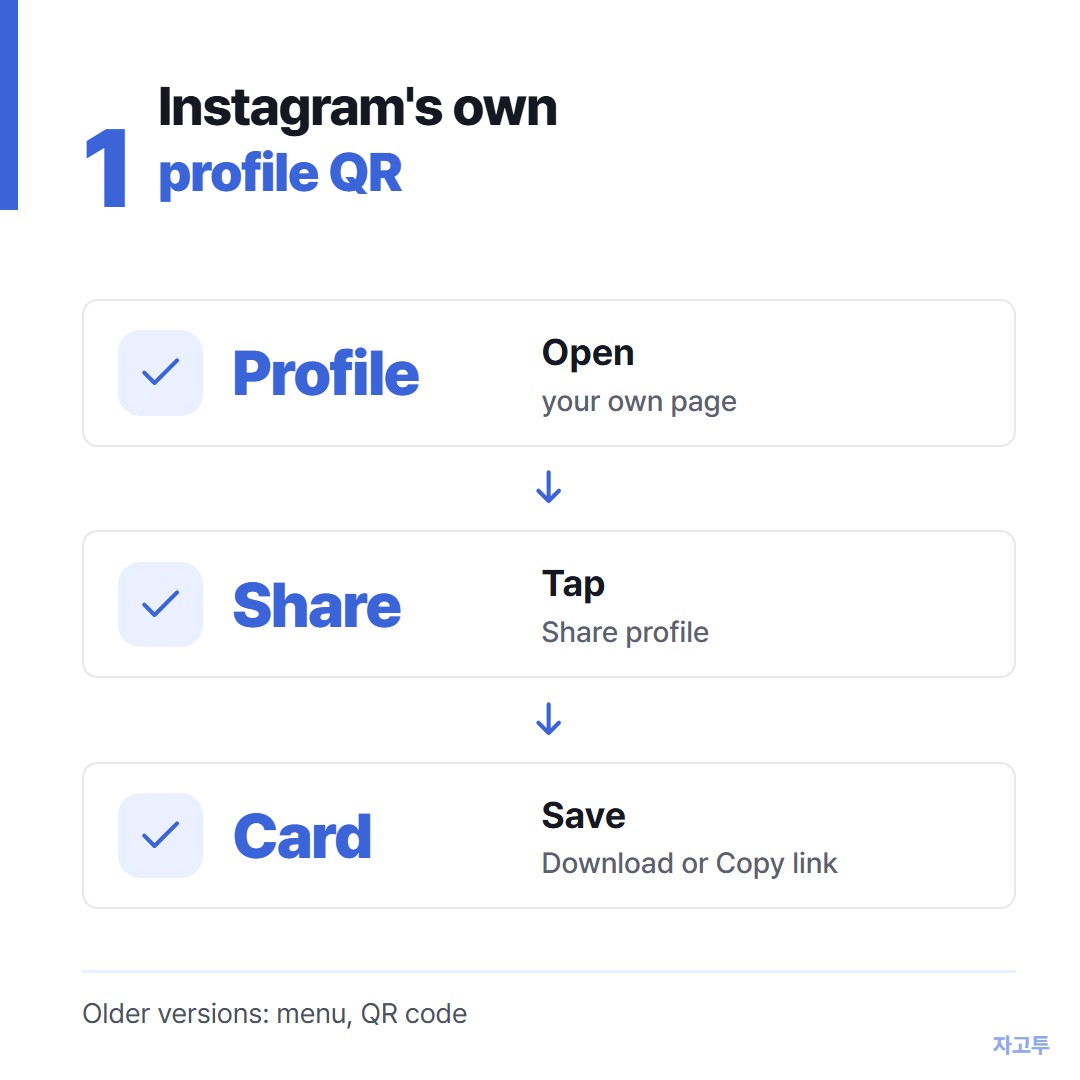
▲ Profile, Share profile, then download or copy the link
For a friend at a party, a new customer at the counter or a slide at the end of a talk, this is the fastest route. It is free, it is already branded, and you do not need any other tool.
2. When a printable code works better
Instagram's card is designed to be shown on a screen. It saves as a picture with the design around it, and it always points to your profile.
A printable code is the better fit in three cases.
- Print that has to stay sharp. A menu, a banner or a die-cut sticker needs a vector file (SVG) that scales without going blurry. A screenshot of the card is a small image.
- A post or reel instead of the profile. A launch post, a recipe reel or a pinned giveaway needs its own link, not your grid.
- Your own look. One dark color that matches your packaging, your logo in the middle, no Instagram frame.
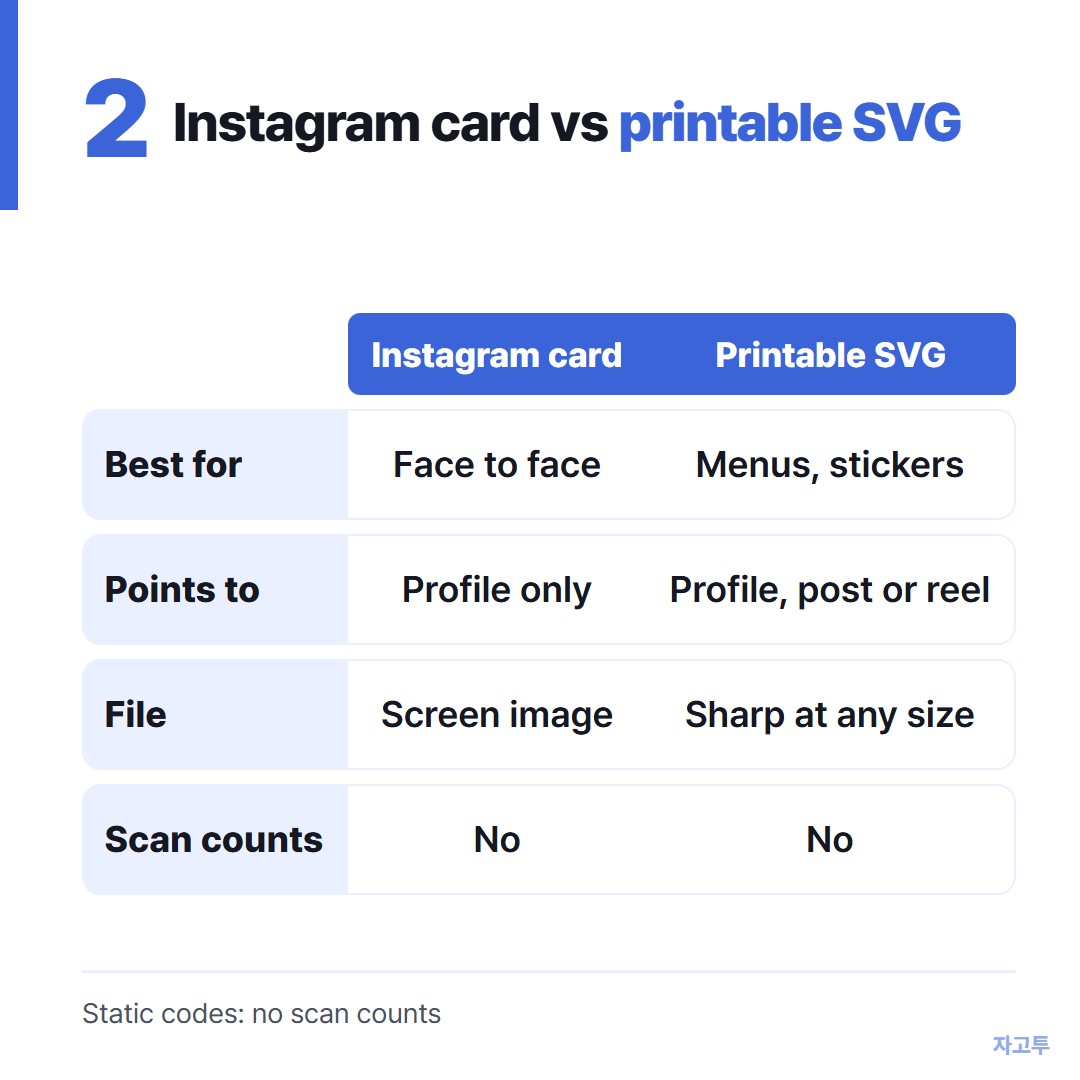
▲ Screen sharing favors the app card, print favors SVG
▲ Scan the printed sample from arm's length before you order a full run
Whatever you choose, scan one printed sample before you order 500 stickers.
3. Make a printable QR code for an Instagram link
First get the right link.
- Profile: `https://www.instagram.com/yourname/`. Type it yourself, or use Copy link from the Share profile card.
- One post or reel: open it, tap the paper plane, then Copy link. The link looks like `instagram.com/p/...` or `instagram.com/reel/...`.
Copied links often end in `?igsh=` followed by a string of letters. That part is a share tag.
Everything before the question mark is enough, and a shorter link makes a simpler code that scans more easily when printed small.
Paste the cleaned link into the free QR Code Generator on ZAGO.TO.
Pick a dark color, drop in your logo if you want one, and download SVG for print or PNG for screens. There is no sign-up.
The URL checks that catch most printing mistakes are in QR code for website links.
4. What a static code cannot do
The codes on ZAGO.TO are static. The link lives inside the pattern, so nothing can expire on you later.
The flip side is honest to state.
- No scan counts. Nothing is tracked, so you will not know how many people scanned.
- No changing the link after printing. If you rename your account, a printed profile code points to the old name. Pick your handle before you print.
- No Instagram-style card. You get a clean code, not the color and emoji frame.
If you need scan statistics or a link you can swap later, a paid dynamic QR service is the right tool.
More on that trade-off in free QR code generator, no expiration.
One more thing: the login QR is something else
Searches for an Instagram QR code often turn up the login code or an authenticator app setup.
Those codes sign you in or set up two-factor protection. They have nothing to do with sharing your profile, and you should never print one or send it to anyone.
Which one to use
| Situation | Best choice | | --- | --- | | Showing your profile to someone in front of you | Instagram's Share profile card | | Slide or story screenshot | Instagram's card | | Menu, sticker, business card, poster | Printable SVG code | | One post or reel | Printable code with the post link | | You need scan counts | Paid dynamic QR service |
For the printable ones, make the code in the QR Code Generator and scan the sample from where your customers will stand.
Other tools: Word Counter · Wheel Spinner
 Days until Christmas
 Word Counter
 Age Calculator
 Wheel Spinner