How to type on a Roku TV without the on-screen keyboard
2026-10-09
This post contains affiliate links. As an Amazon Associate, ZAGO.TO earns from qualifying purchases.
You need to sign into a streaming app on the Roku. The email address is 27 characters long, and the remote moves one letter at a time across a grid.
How to type on Roku without that grid comes down to three choices: your voice, your phone, or patience. For anything longer than a short search, the phone wins.
1. Three ways to type on a Roku, side by side
▲ The search box is on the TV, the keyboard is in your hand
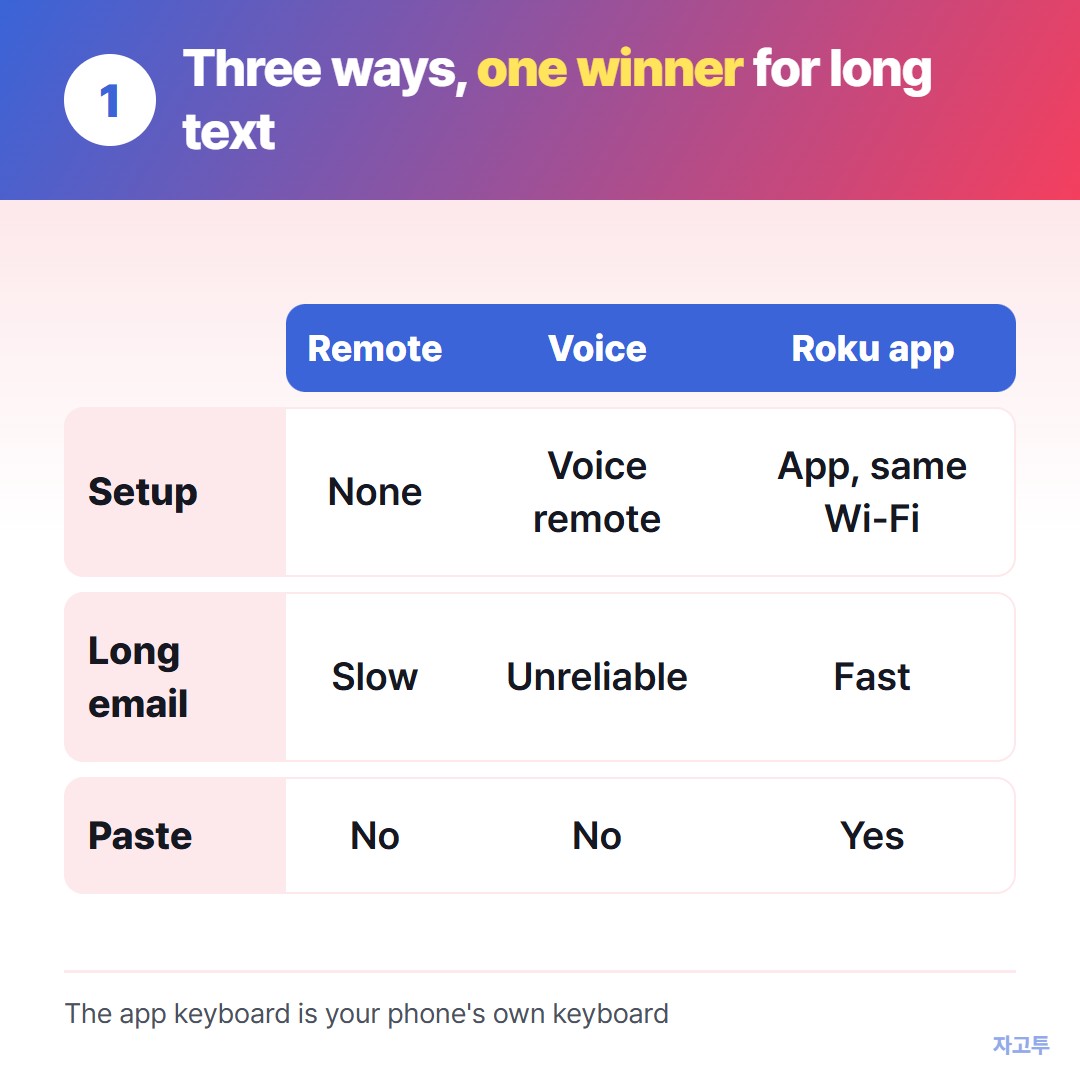
▲ The app keyboard is the only one that takes pasted text
- Remote and on-screen grid: works on every Roku, with no setup. Fine for a show title, slow for an email address.
- Voice: on a voice remote, hold the microphone button and speak. Good for searches, unreliable for addresses, symbols and passwords.
- The Roku mobile app: the free official app turns your phone into a remote with a real keyboard. You type on your phone's keyboard, and the letters appear on the TV.
2. How to use the Roku app keyboard
- Install the Roku app on your iPhone or Android phone
- Connect the phone to the same Wi-Fi network as the Roku
- Open the app, choose your Roku device, and open the remote screen
- Select a text box on the TV, then tap the keyboard icon in the app
Because it is your phone's own keyboard, you can also paste. Copy the email address on your phone, paste it into the app, and it lands in the TV field in one go.
3. When the Roku remote app keyboard is not working
The keyboard icon does nothing until a text field is active on the TV. Highlight the box first.
If the app cannot find the Roku at all, the phone is usually on a different network, such as a guest Wi-Fi or mobile data.
Still stuck? On the Roku, look under Settings, System, Advanced system settings, Control by mobile apps, and check that network access is not turned off.
4. When the text is on a laptop, not your phone
Pasting only helps if the text is already on the phone. Often it is not. The sign-in email is in a message on your laptop, or the long title is in a browser tab.
The Roku has no web browser, so nothing can be opened on the TV itself. The step that helps is getting the text onto the phone first.
ZAGO.TO does that hop. Paste the text at zago.to on the laptop and you get a 4-digit code. Type the code at zago.to on your phone, copy the text, and paste it into the Roku app keyboard.
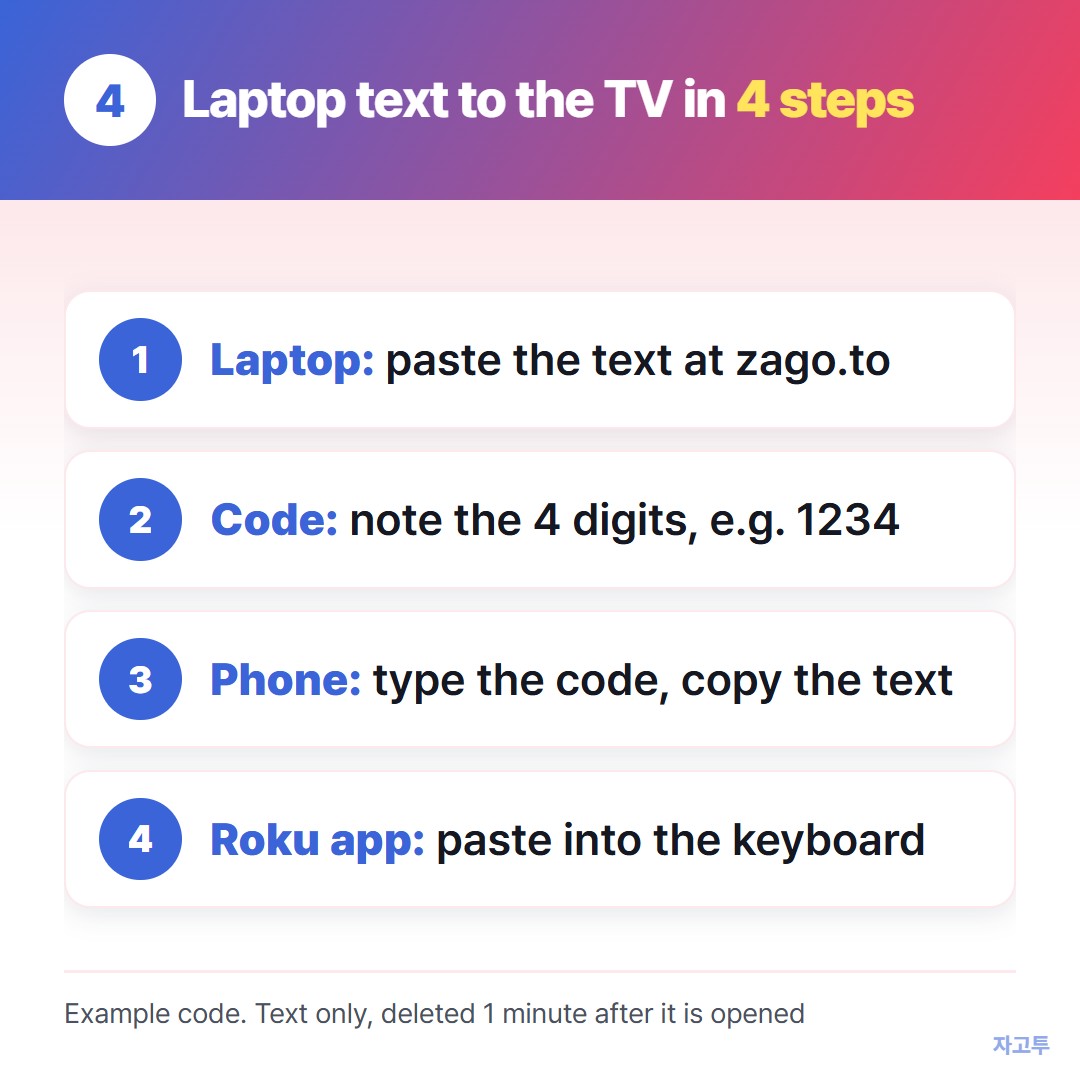
▲ An example code. Real codes are random every time
It carries text only, up to 10,000 characters. Unopened text is deleted after 1 minute, and opened text 1 minute later.
There is no in-browser encryption yet, so our server can read what you send. Do not move passwords this way.
For TVs that do have a browser, How to type on a smart TV without the remote and Send link to TV from your phone go further.
Quick questions
Can I plug a keyboard into a Roku? Roku does not document general keyboard support, so do not count on a USB or Bluetooth keyboard. The app keyboard is the dependable route.
Does the app work without Wi-Fi? No. The phone and the Roku have to be on the same home network.
Why does the keyboard keep popping up in the app? It opens when the TV shows a text box. Close it, or move off the search screen.