How to type on a Fire TV with your phone, and skip the remote
2026-10-10
This post contains affiliate links. As an Amazon Associate, ZAGO.TO earns from qualifying purchases.
The streaming app wants an email and a password. The Fire TV remote moves one square at a time, and the cursor keeps jumping back to the letter A.
How to type on a Fire TV with your phone is one free app away. Your phone's keyboard can type straight into the box on the TV.
Here is the setup, the fix when that keyboard goes quiet, and what to do when the text is not on your phone at all.
1. Set up the Fire TV app as a keyboard
▲ The text box is on the TV, the letters come from your hand
Amazon makes a free Fire TV app for iPhone and Android. It works as a remote, and it has a keyboard button.
- Install the Amazon Fire TV app from the App Store or Google Play
- Put the phone on the same Wi-Fi network as the Fire TV Stick
- Open the app and pick your Fire TV from the list
- A code appears on the TV screen. Type it into the app to pair
Pairing happens once. After that, the app finds the stick by itself whenever you are home.
2. Type on the Firestick with your phone, step by step
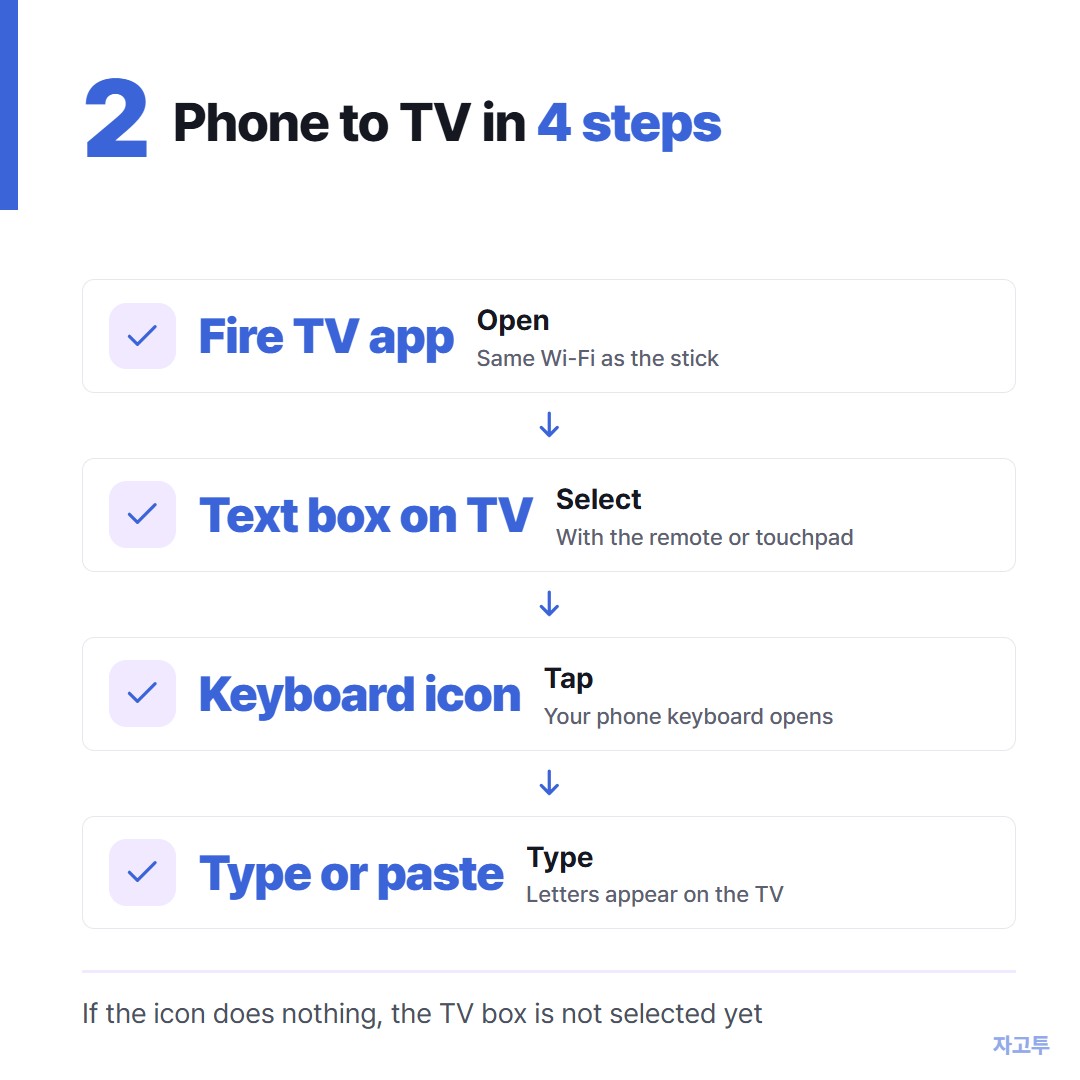
▲ The keyboard icon only wakes up when a text box is selected
With the remote or the app's touchpad, move to the search bar or the sign-in field on the TV and select it.
Now tap the keyboard icon in the app. Your phone's normal keyboard opens.
Whatever you type shows up on the TV a moment later. Because it is your phone's own keyboard, paste works too.
That matters for long things. Copy the email address from your mail app, switch to the Fire TV app, and paste it in one go.
3. When the Fire TV app keyboard is not working
The most common cause is simple. No text field is active on the TV, so the icon has nothing to type into. Select the box on screen first, then try again.
If the app says it cannot find a device, check the network. A phone on mobile data, a guest Wi-Fi or a VPN cannot see the stick.
Other things worth trying, in this order:
- Close and reopen the app. The connection drops quietly after a while.
- Restart the Fire TV. Hold Select and Play together on the remote for a few seconds.
- Re-pair. Remove the device in the app and pair it again with a fresh code.
Some third-party apps on the TV draw their own keyboard instead of the system one. In those, the app keyboard may not reach the field, and the remote grid is the only way in.
4. How to type on a Firestick without the remote or the app
A Bluetooth keyboard also works. On the Fire TV, open Settings, then Controllers and Bluetooth Devices, then Other Bluetooth Devices, and pair it there.
This is the one route that does not need Wi-Fi.
So when the TV is asking for the Wi-Fi password itself, a keyboard or the remote is what you have. The phone app cannot connect until that password is in.
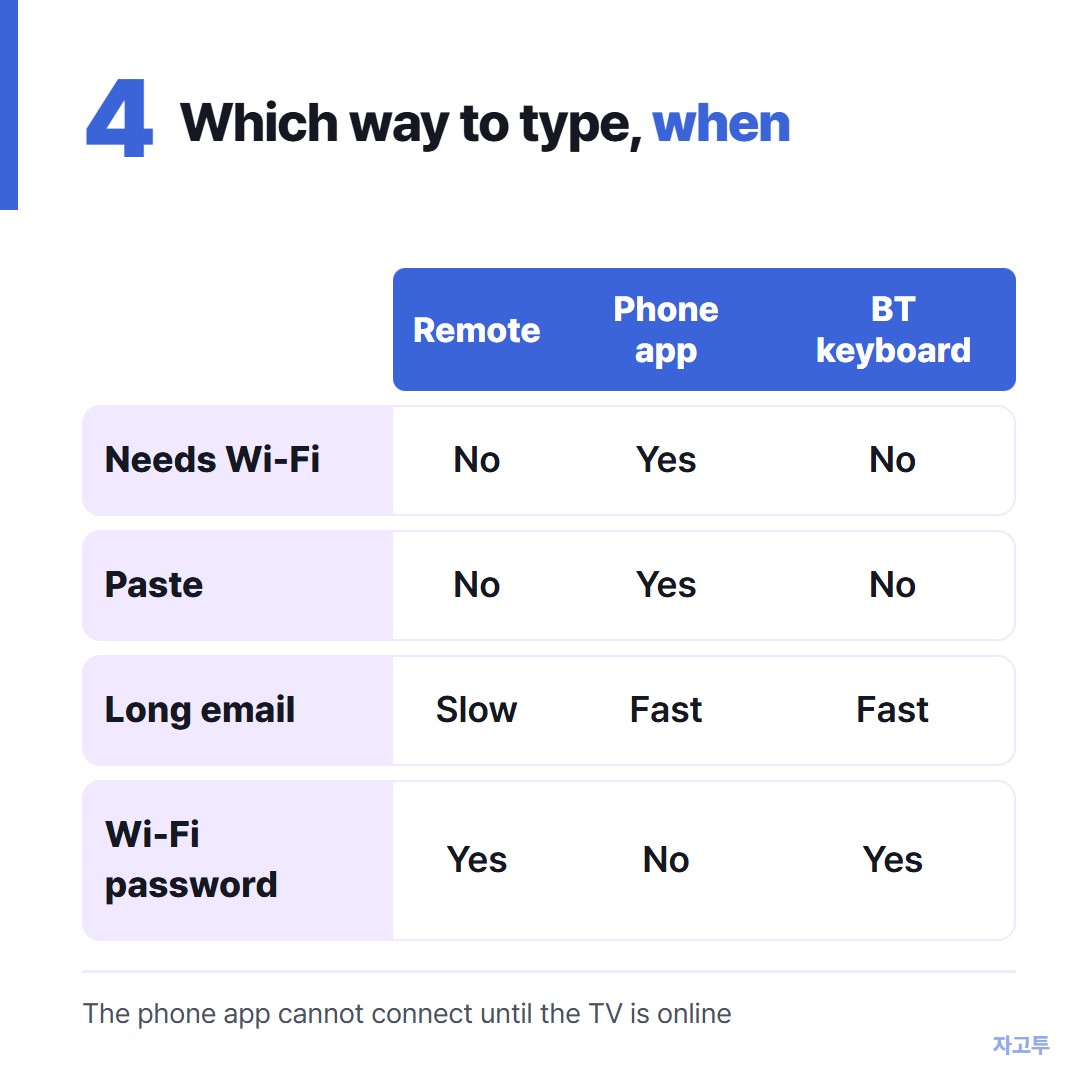
▲ Each method has one situation it cannot handle
5. When the text is on your laptop, not your phone
Sometimes the long thing you need is a URL for the Silk browser on the TV, and it is sitting in a tab on your laptop.
Typing that URL with any keyboard is error-prone. A shorter hop is ZAGO.TO. Paste the URL at zago.to on the laptop and you get 4 digits.
Open Silk on the Fire TV, go to zago.to, and type those 4 digits with the remote. Four digits on the grid is quick. The full link appears and you can open it.
It has limits. It carries text only, up to 10,000 characters, never files.
If nobody opens it within 1 minute it is deleted, and once opened it stays only 1 minute more, so you cannot open it again later.
There is no in-browser encryption yet, which means our server can read what you send. Keep passwords out of it. For those, type them on the phone app where nothing passes through a third party.
For TVs from other makers, How to type on a smart TV without the remote covers the same problem.
Send link to TV from your phone goes deeper on links.
The bottom line
Install the Fire TV app, select the box on the TV first, then tap the keyboard icon. Paste does the heavy lifting for long emails.
Use a Bluetooth keyboard when there is no Wi-Fi yet. And when the link lives on your laptop, ZAGO.TO gets it to the TV in four digits.