How to send a text to yourself on Android, and when the note-to-self thread gets crowded
2026-10-21
This post contains affiliate links. As an Amazon Associate, ZAGO.TO earns from qualifying purchases.
You are at the pharmacy counter and the order number is on the PC at home, read out to you over the phone. You open Messages, start a new chat, type your own number and send. Now it is on your phone.
That is how to send a text to yourself on Android in one go.
This post covers the two apps most people use for it, the three reasons the text behaves oddly, and the point where a thread full of notes stops being useful.
Contents
- How to send a text to yourself on Android in Google Messages
- WhatsApp: the "You" chat
- Why a text to yourself acts strangely
- When the thread gets crowded
- Quick answers
1. How to send a text to yourself on Android in Google Messages

▲ Your own number in the To field is the whole method
Open Google Messages, tap Start chat, and type your own phone number in the To field. Your contact card may show up as "You" or as your name. Type the note and send.
The thread now sits in your list like any other conversation. Pin it by holding the thread and tapping the pin icon, so it stays at the top.
Samsung Messages works the same way. Start a new conversation, enter your number, and send.
2. WhatsApp: the "You" chat
Open WhatsApp, tap the new chat button, and look at the top of the contact list. The entry marked You, or Message yourself, opens a chat with only you in it.
This chat syncs to WhatsApp on your computer too, which is why many people use it instead of Messages. It holds links, photos and voice notes, and it never costs a text.
3. Why a text to yourself acts strangely
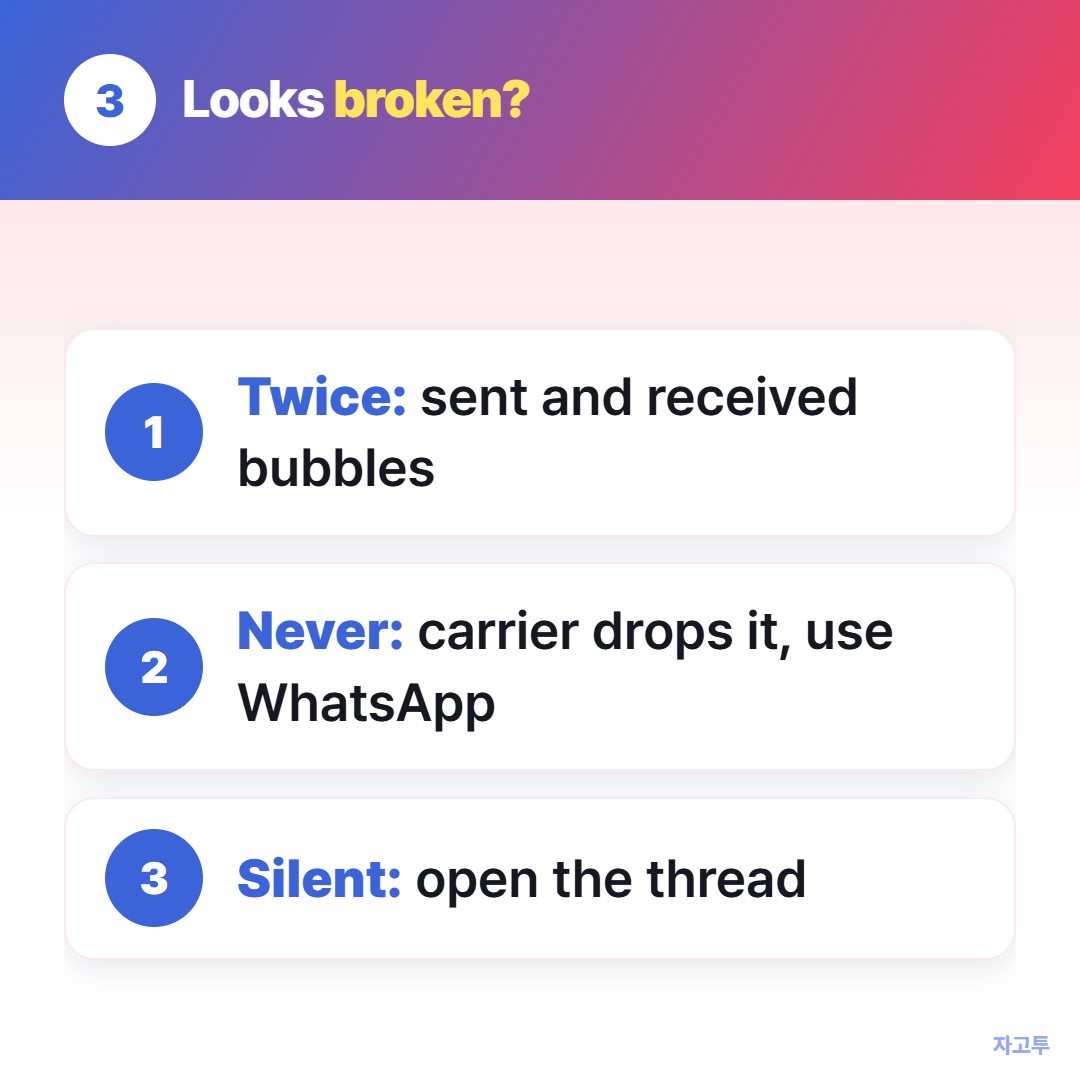
▲ Check these before you decide it failed
- It arrived twice. Some carriers deliver a text to the sender's own number as both a sent and a received message. Nothing is wrong. You see two bubbles.
- It never arrived. A few carriers drop texts sent to the sender. If the bubble shows sent but nothing comes back, your carrier is one of them, and the WhatsApp route is the fix.
- It arrived silently. Messages from your own number rarely ring. Open the thread before you decide it failed.
If email is where your notes end up instead, how to email yourself has the same checks for Gmail and Outlook.
4. When the thread gets crowded
A text to yourself is perfect for a parking spot or a gate number.
The trouble starts when the thread becomes a shoebox: six months of links, addresses and half-written drafts with no search worth the name.
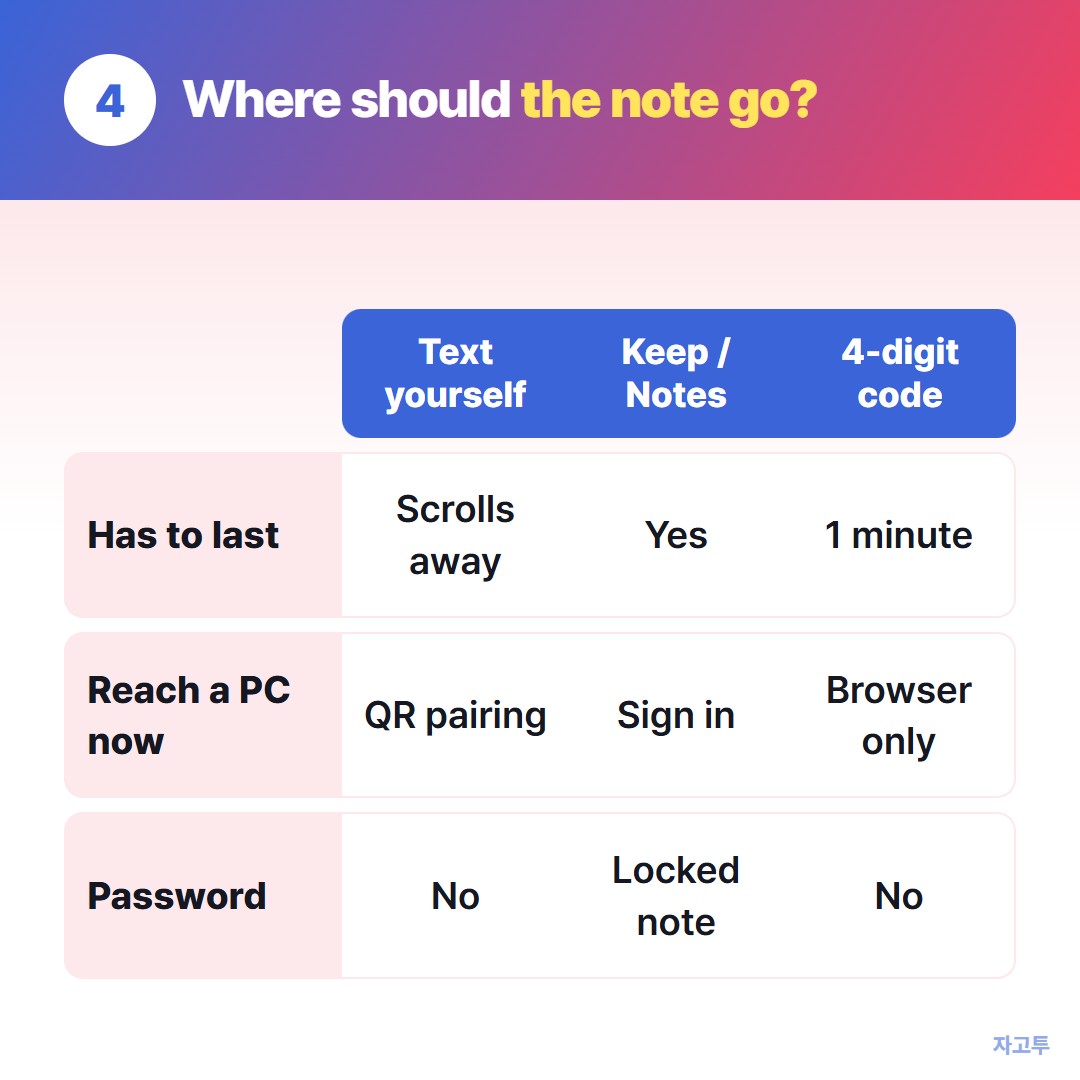
▲ Pick the place by how long the note has to live
- It has to last. Use Google Keep or Samsung Notes. They search, they sync, and a note does not scroll away.
- It has to reach a PC right now. Messages for web needs a QR scan on the PC and your phone online. On a work or library PC you may not want to pair anything.
- It is a password or a code. A text thread keeps it in plain view and in every backup.
For the second case, a single paragraph that only has to cross from phone to PC once, ZAGO.TO works in the browser on both sides.
Paste the text on your phone, get a 4-digit code, type the digits at zago.to on the PC.
ZAGO.TO is text only, up to 10,000 characters, no photos.
The text is deleted 1 minute after it is opened, or after 1 minute if nobody opens it, and it cannot be reopened.
Our server can read what passes through, since in-browser encryption is not built yet, so the password case above stays out of it as well.
The longer way round, with cables and Phone Link, is in Copying text between an Android phone and a PC.
5. Quick answers
Can you send a text to yourself on Android? Yes. Start a new chat in Messages with your own number, or open the You chat in WhatsApp.
Does it cost anything? A Messages text uses your plan like any other SMS or RCS message. WhatsApp uses data only.
Why does my note show up on my tablet too? If the tablet is signed in to the same WhatsApp or Messages account, the thread syncs. That is a feature when you want it and a leak when you do not.
Is a note to self private? It is as private as your phone and your backups. Anyone who can open your Messages app can read the thread.
 Days until Christmas
 Word Counter
 Age Calculator
 Wheel Spinner