How to send a link on Telegram, in chats, channels and stories, with or without the preview
2026-10-22
This post contains affiliate links. As an Amazon Associate, ZAGO.TO earns from qualifying purchases.

Why does the same link behave three different ways on Telegram, depending on where you put it?
In a chat it becomes a big preview card. In a channel the preview can be turned off per post. In a story it is tappable for some accounts and plain text for others.
How to send a link on Telegram is really three small questions. This post takes them in order, then compares the two ways of getting the link into the app in the first place.
Contents
- Paste or share sheet: two ways in, compared
- How to send a link on Telegram in a chat, and trim the preview
- Posting a link in a channel or group
- Putting a link on a Telegram story
- Sharing a channel or group link itself
- When the link is on the wrong device
- Quick answers
1. Paste or share sheet: two ways in, compared
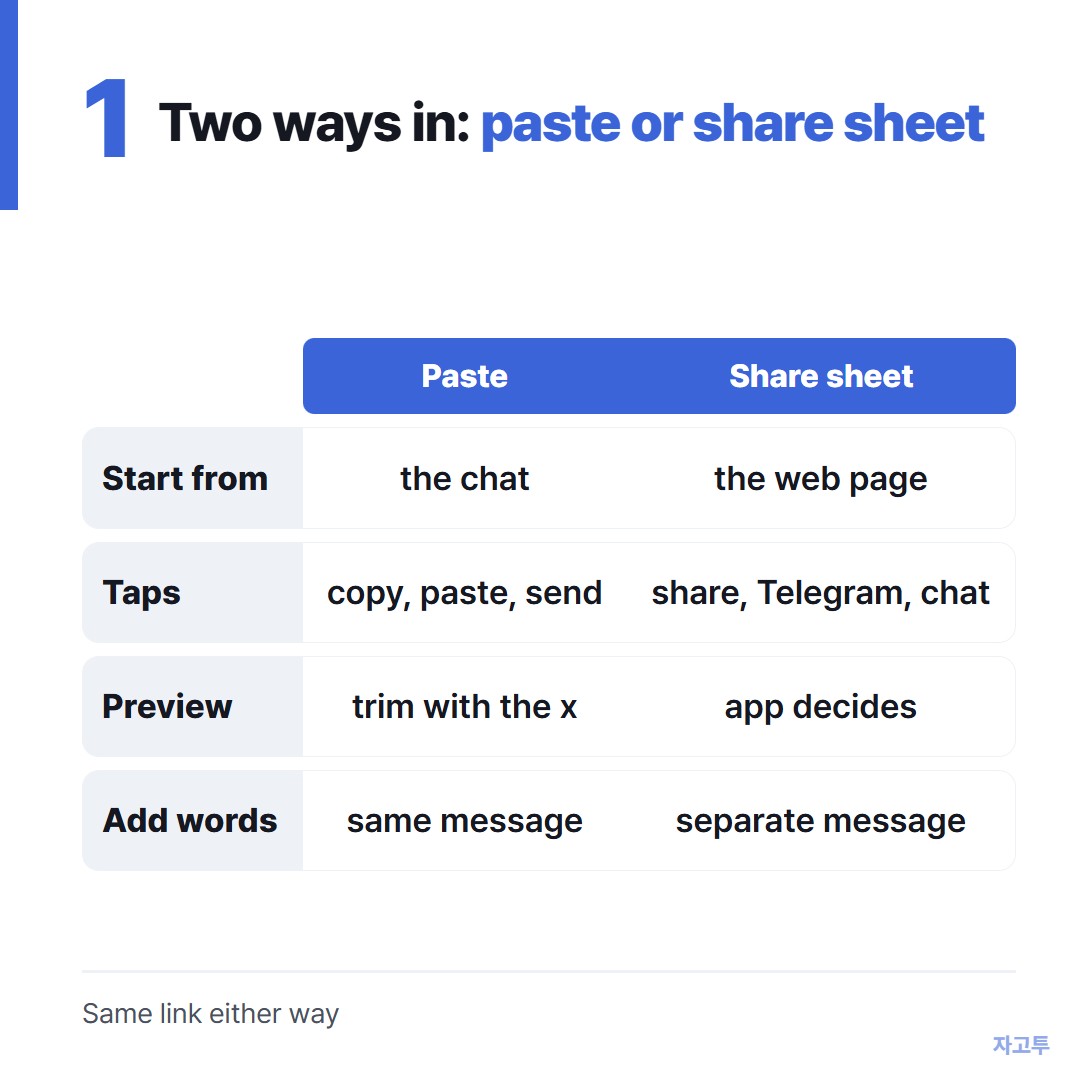
▲ Paste when you are already in the chat, share when you are already on the page
- Paste: copy the address from the browser, open the chat, press and hold in the message box, tap Paste, send. You see the link before it goes and can add a line above it
- Share sheet: on the web page, tap the browser's share button, pick Telegram, pick the chat. Faster, but the link goes as its own message and the app chooses the preview
Both land the same link. Paste gives you control over the preview and the wording, the share sheet saves two taps. Nothing about the link itself changes.
2. How to send a link on Telegram in a chat, and trim the preview
Paste the link and Telegram builds a preview above the message box before you send: title, image, a line of text. Tap the small x on that preview and the message goes out as the bare link.
For an existing message, the preview stays as it was sent. Edit the message and remove the preview there if the chat is yours.
To stop previews for good, open Settings, Privacy and Security, and turn off link previews. Previews then stop appearing in what you send and in what you see.
That is a wider change than most people want. The per-message x is enough for most.
A link sent to yourself goes to Saved Messages, the chat at the top of your search results. It keeps the link until you delete it, the same way other apps keep self-chats.
The WhatsApp version of this, including the preview trim, is in How to send a link on WhatsApp.
3. Posting a link in a channel or group

▲ A bare link and a link behind words are the same address with different clothes
In a channel you post the way you message, with two extras.
Formatting. Select a word in the post, and the pop-up menu has Formatting, then Link. Paste the address and the word becomes the link.
The post then reads "the full schedule is here" instead of a line of https. On a desktop, the shortcut is the usual Ctrl or Cmd with K.
Preview per post. Channel admins can toggle the preview off for one post with the same x, and many channels do, because a wall of preview cards reads badly. The text stays clickable.
Groups work like chats. The one difference is that admins can restrict who may send links at all, under the group's permissions. That is why a link sometimes refuses to go in a group you are new to.
4. Putting a link on a Telegram story
Telegram stories take a caption, and a link in the caption is where the autocomplete how to post a link on telegram story comes from.
Whether the link is tappable depends on the account. Telegram ties clickable story links to its paid Premium tier.
Without it, the address shows as plain text. Viewers have to copy it out by hand, which almost nobody does.
So the working method for a story link without Premium is to keep the link short and recognisable, and say the site name in the caption.
Put the full link in your channel or a pinned message where it is tappable.
5. Sharing a channel or group link itself
Sometimes the link you want to send is the Telegram channel or group. The top YouTube results for this topic are all that question.
Open the channel or group, tap its name at the top to open the info page, and look for the link under the description. A public channel has a short one, t.me followed by its name. Tap it to copy.
A private channel or group has no public name. Instead, the info page has an invite link, and admins can make more than one, each with its own expiry and member limit.
Copy that and send it like any other link. If the invite link stops working, an admin revoked it or it expired, and a fresh one is the fix.
6. When the link is on the wrong device
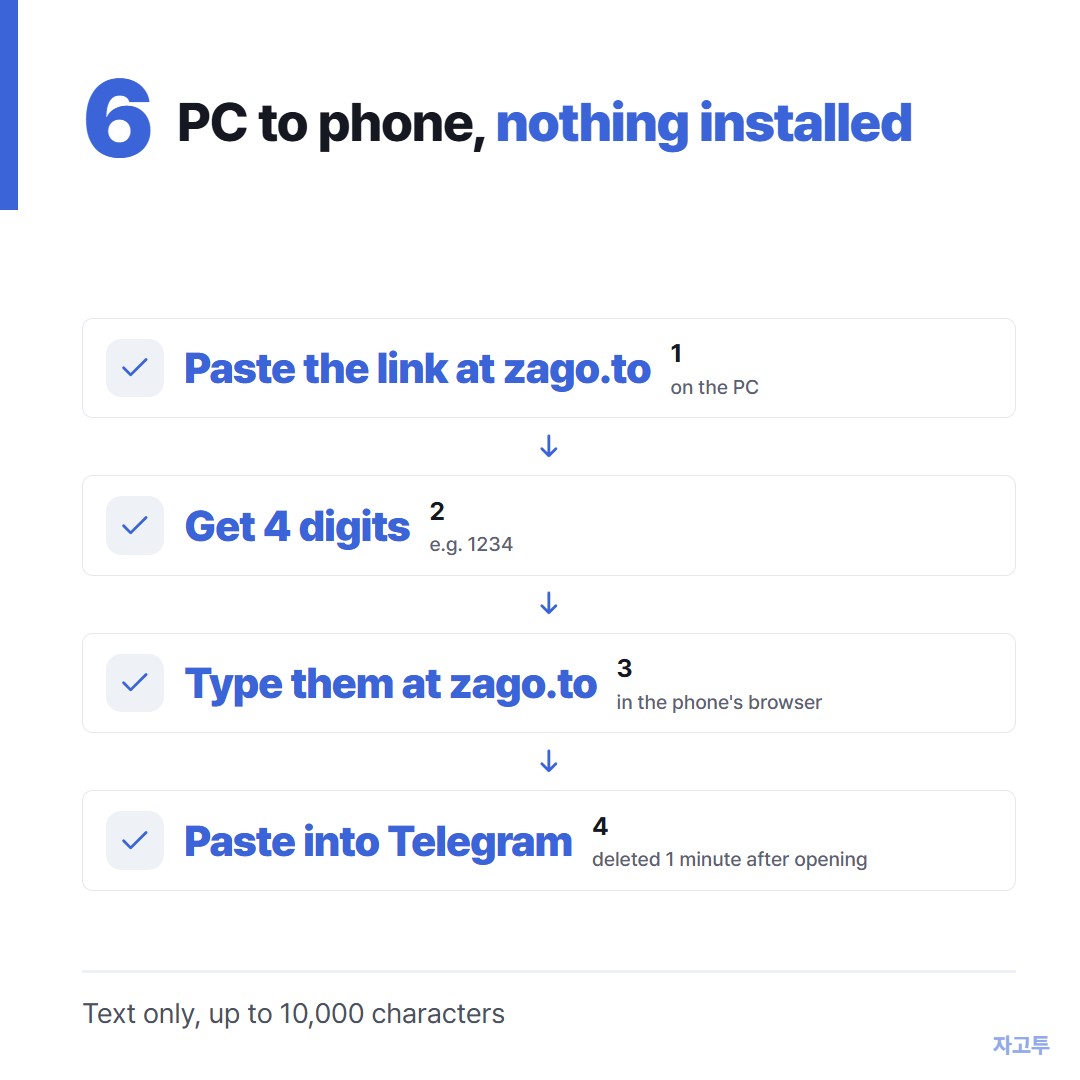
▲ The link is on the screen in front of you, Telegram is on a phone in your pocket
Telegram syncs across devices once you are signed in, so a link in Saved Messages on the laptop appears on the phone.
The gap is the device that is not signed in: a work PC where you will not install Telegram, a friend's laptop, a shared computer.
ZAGO.TO carries the link across that gap as text. Paste the address at zago.to on the PC and the page returns a 4-digit code, 1234 for instance.
Type those digits at zago.to in the phone's browser, copy the link, and paste it into the Telegram chat. No account, nothing installed on either side.
The code grows to five digits only when every four-digit one is taken.
The text is deleted one minute after it is opened, or one minute after sending if nobody opens it, and it cannot be opened twice. Have Telegram open before you type the digits.
What ZAGO.TO does not do: it moves text only, up to 10,000 characters, never a file or an image. There is no in-browser encryption yet, so the server can read the link during that minute.
A public web address is fine. A private invite link to a closed group is a judgment call, and a password is not fine at all.
A long link does not need shortening for this, which is covered in Sending a long URL to your own phone, unshortened.
7. Quick answers
Does the other person see when I remove the preview? No. They get a plain link, nothing marks it as trimmed.
Can I send a link that opens inside Telegram? Links to t.me open in the app. Everything else opens in the in-app browser or the phone's browser, depending on Chat Settings.
Why did my link turn blue but not clickable? Usually a missing https at the front, or a space inside the address. Copy it again from the browser's address bar.
Is there a limit on how many links in one message? No fixed limit, but only the first link gets a preview.
 Days until Christmas
 Word Counter
 Age Calculator
 Wheel Spinner