vCard QR code, a contact that saves itself, and the fields that break it
2026-10-31
This post contains affiliate links. As an Amazon Associate, ZAGO.TO earns from qualifying purchases.
Someone scans the code on your table tent, and instead of a website, a contact card slides up on their phone with your name and number already filled in.
One tap on Save and you are in their contacts. That is a vCard QR code.
It sounds like magic, but it is just a few lines of plain text. Once you see what is inside, it is easy to tell why some codes scan in a second and others make the camera hunt.
1. What a vCard QR code actually holds
A vCard is a small text format for contacts. A minimal one looks like this:
``` BEGIN:VCARD VERSION:3.0 FN:Jamie Rivera TEL:+15551234567 END:VCARD ```
The QR code stores those exact characters. When the camera reads `BEGIN:VCARD`, the phone knows it is a contact and offers to save it. Nothing is fetched from the internet, so the code works offline and never expires.
You can add more lines: `EMAIL`, `URL`, `ORG` for the company, `TITLE`, `ADR` for the address, even a `NOTE`. Each one adds characters, and that is where the trouble starts.
2. Why more fields make a denser code
A QR code grows in steps called versions. More text means a higher version and more tiny squares packed into the same space. Here is what that looks like at medium error correction:
| What is inside | Characters | Grid size | |---|---|---| | A short website link | 33 | 29 × 29 | | Name and phone vCard | 66 | 37 × 37 | | Full vCard (two phones, email, site, address, note) | 325 | 69 × 69 |
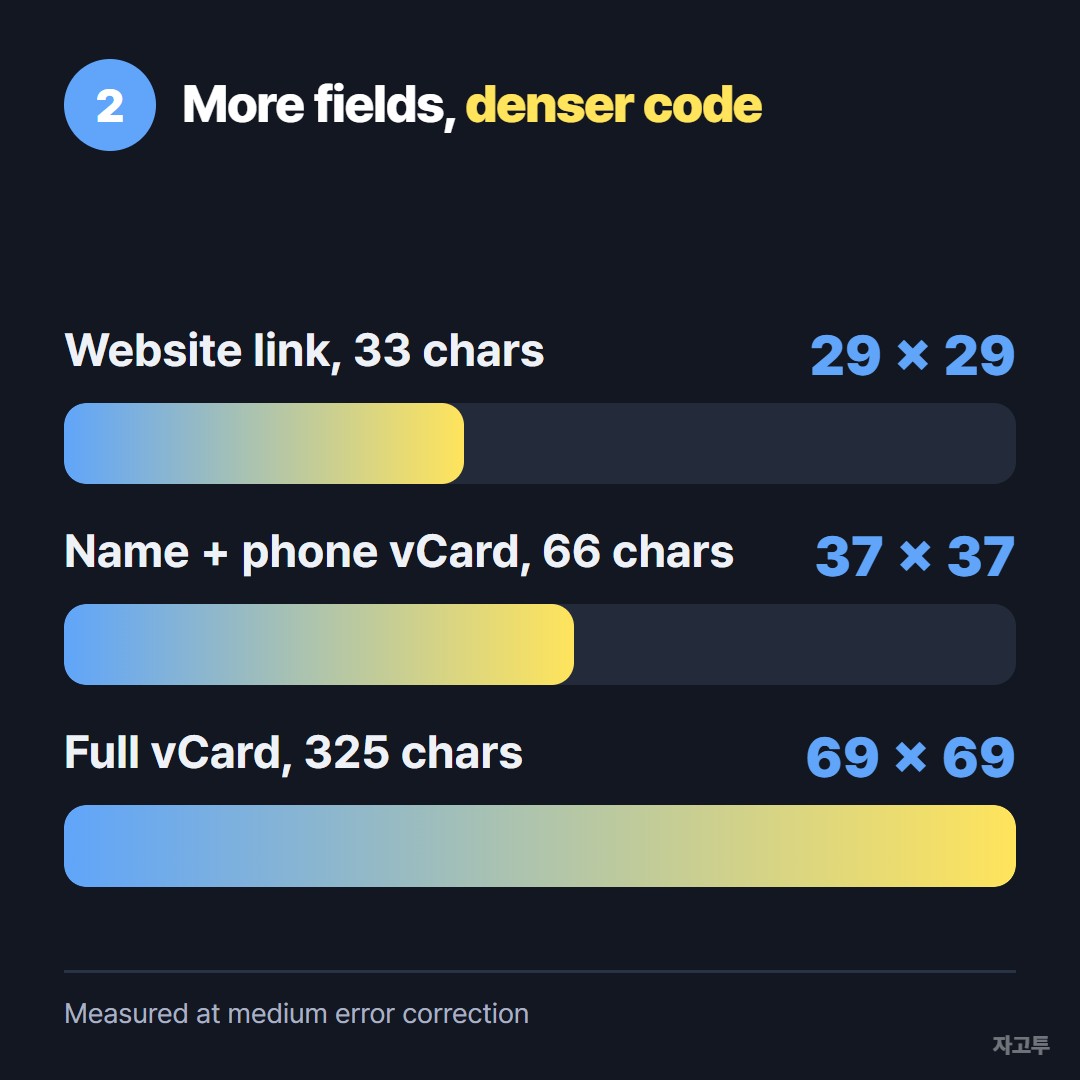
▲ The full card squeezes almost twice as many squares across the same width
Printed at the same size, the full card's squares are about half as wide. On a business card or a small sticker, that is the difference between an instant scan and a phone that keeps refocusing. If you need every field, print bigger. If the code must stay small, cut it down to name, phone and email.
How large to print on a card is covered in QR code for business card: contact info or a link.
3. Static vs dynamic, and the fields that break it
A static vCard QR code holds the contact itself. It is free forever, but it cannot change. New phone number, new code.
A dynamic code holds a short link that points to your contact page, so you can edit it later. The catch is that the link depends on the service staying up, and most charge a monthly fee for it. That is a fair trade if your details change often.
A few details quietly break vCards:
- Phone format: write the full international form, like `+1 555 123 4567`. A local number can dial wrong abroad
- Commas and semicolons: inside a vCard they separate parts of a field. In a company name like "Rivera, Inc." they need escaping, and many generators skip it
- Line breaks: a pasted address with a line break can split into the wrong field
- Accents and non-Latin names: most new phones read UTF-8 fine, but older scanners can show broken characters
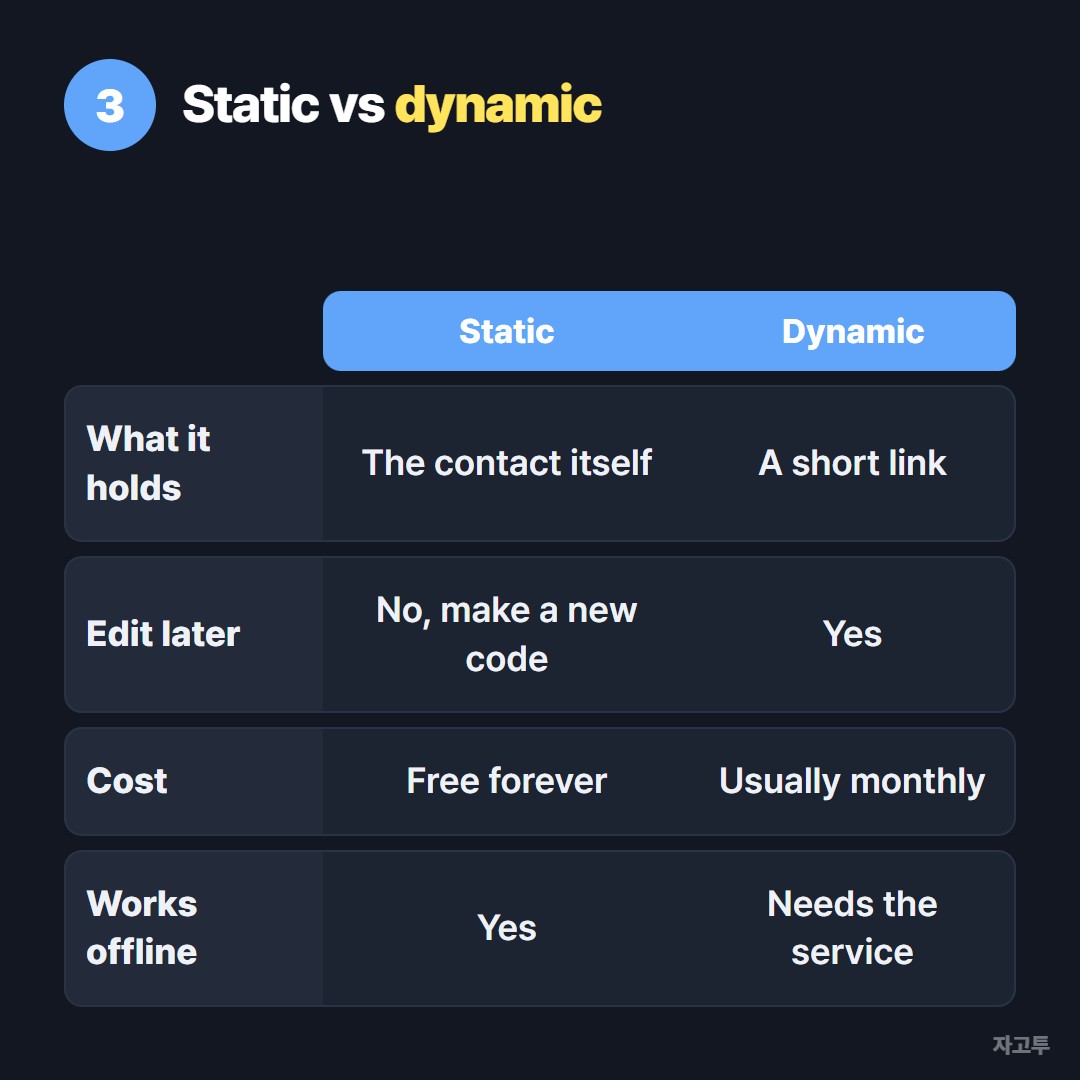
▲ Static is free and permanent, dynamic is editable and usually paid
4. Make one and test it on two phones
The ZAGO.TO QR Code Generator has a Contact mode that builds a name and phone vCard and gives you a PNG to download. It does not add email, company or address fields, so for a full card you will want a generator with more fields.
Before printing, test with at least two phones:
- iPhone: open the Camera, point it at the code, and tap the contact banner
- Android: use the camera or Google Lens and choose Add contact
- Check that the name lands in the name field and the number dials correctly
▲ Two phones, two seconds each, before you print a hundred
One-line takeaway
Keep the vCard short enough to scan easily, write the phone in international form, and test on both iPhone and Android before you print.
Make your contact code with the QR Code Generator. Other tools: Word Counter · Days Until
 Days until Christmas
 Word Counter
 Age Calculator
 Wheel Spinner