Meta description length in 2026: about 150 to 160 characters, and why Google cuts by pixels
2026-11-07
This post contains affiliate links. As an Amazon Associate, ZAGO.TO earns from qualifying purchases.
You search for your own bakery and the snippet under the title stops mid-sentence: "...see why locals have been lining up at our..." The last word you cared about never made it onto the page.
The usual answer is "keep it under 160 characters." That is close, but it is not how Google decides where to cut.
▲ The description was 179 characters, and the best part fell off the end
So here is the practical version of the meta description length question: the range that is safe, the reason it is a range and not a hard number, and how to check a draft in under a minute.
In this guide
- The short answer for 2026
- Why Google measures pixels, not characters
- Desktop and mobile do not cut in the same place
- Worked example: 179 characters down to 143
- Google may not use your description at all
- A checker in your browser, and what it cannot tell you
1. The short answer for 2026
Write the meta description so the full message fits in about 150 to 160 characters, spaces included. Put the words that matter in the first 120.
That range has held for years, and nothing announced in 2025 or 2026 changed it.
Google's own documentation says there is no maximum length for a meta description. What it says instead is that snippets are truncated as needed, typically to fit the device width.
That one sentence explains every confusing answer you will find online. A "limit" is really a display width, and characters are only a rough way of guessing how much fits in it.
| Length | What usually happens on desktop | |---|---| | Under 70 characters | Shows in full, but often too thin to earn a click, and Google is more likely to write its own | | 120 to 150 characters | Shows in full in most cases | | 150 to 160 characters | Usually shows in full, depends on which letters you used | | Over 160 characters | Likely cut with an ellipsis |
Note the word "usually." The table is the most common outcome, not a rule Google publishes.
2. Why Google measures pixels, not characters
Search results are set in a proportional font. In a proportional font, letters take up different amounts of room.
- A capital W or M is several times wider than a lowercase i or l
- Digits sit in between
- Spaces and periods are narrow
So 155 characters of "illicit little lilies" and 155 characters of "MAXIMUM WOW" are very different widths. The first fits easily. The second runs off the edge.
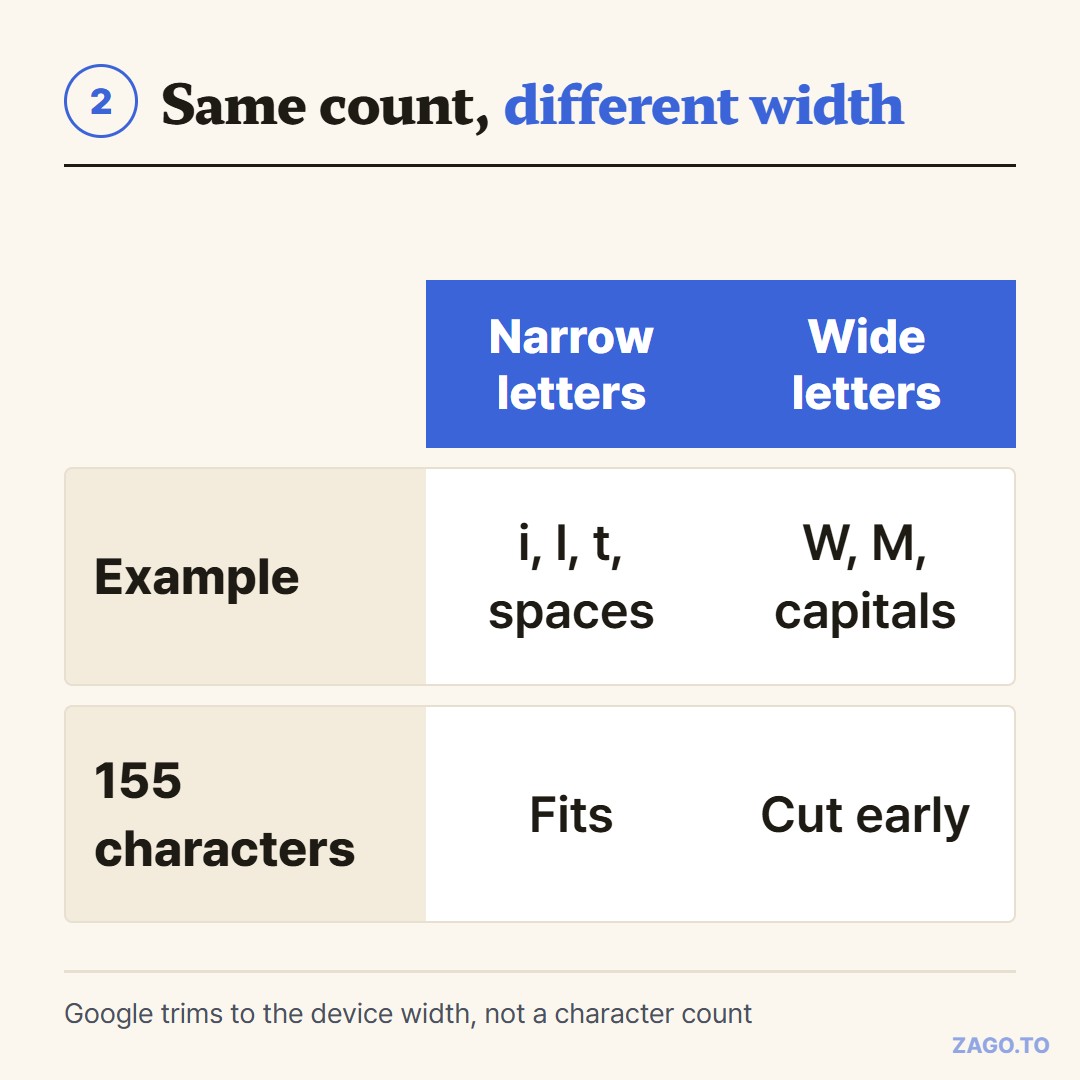
▲ Same character count, different width, different place where the cut lands
SEO tools that preview snippets usually work from a desktop width of roughly 920 pixels.
That figure comes from measuring search pages, not from a Google spec, so treat it as an estimate that tools agree on.
The practical takeaway is simple: a description written in normal sentence case, with no all-caps words, fits about 155 characters on desktop.
All caps or long runs of wide letters bring that number down.
3. Desktop and mobile do not cut in the same place
The autocomplete for this topic asks about Google, SEO, limits and 2026. A lot of that confusion comes from comparing a desktop screenshot with a phone screenshot.
On a phone, the result card is narrower but the text wraps onto more lines. Depending on the phone and the layout of the result, the snippet can end earlier or later than it does on a laptop.
Because there is no single mobile number that holds across devices, the safest habit is about order, not length.
- Lead with the thing the searcher is looking for: the product, the answer, the place
- Put the call to action, such as "order online" or "free shipping," before the 120th character
- Leave the nice-to-have detail for the end, where losing it costs little
If the first 120 characters make sense on their own, the description survives on any screen.
4. Worked example: 179 characters down to 143
Here is the bakery description from the opening.
Fresh sourdough bread baked every morning in downtown Portland. Order online for pickup, browse our seasonal menu, and see why locals have been lining up at our bakery since 2014.
That is 179 characters with spaces, 150 without, and 30 words. On desktop it will almost certainly be cut, and the cut lands in the part about the bakery's history.
Trimming it is mostly removing words that repeat what the page title already says.
- "Fresh sourdough bread" becomes "Sourdough." The title already says bakery, and "fresh" adds no information
- "Order online for pickup" gains a detail people actually search for: "7 a.m. pickup"
- "see why locals have been lining up" goes. It is a nice line, but it is a claim, not a reason to click
- "seasonal menu" becomes something specific: "this week's seasonal loaves, pastries and coffee"
Sourdough baked every morning in downtown Portland. Order online for 7 a.m. pickup, or browse this week's seasonal loaves, pastries and coffee.
That is 143 characters. The location and the pickup time are both inside the first 90.
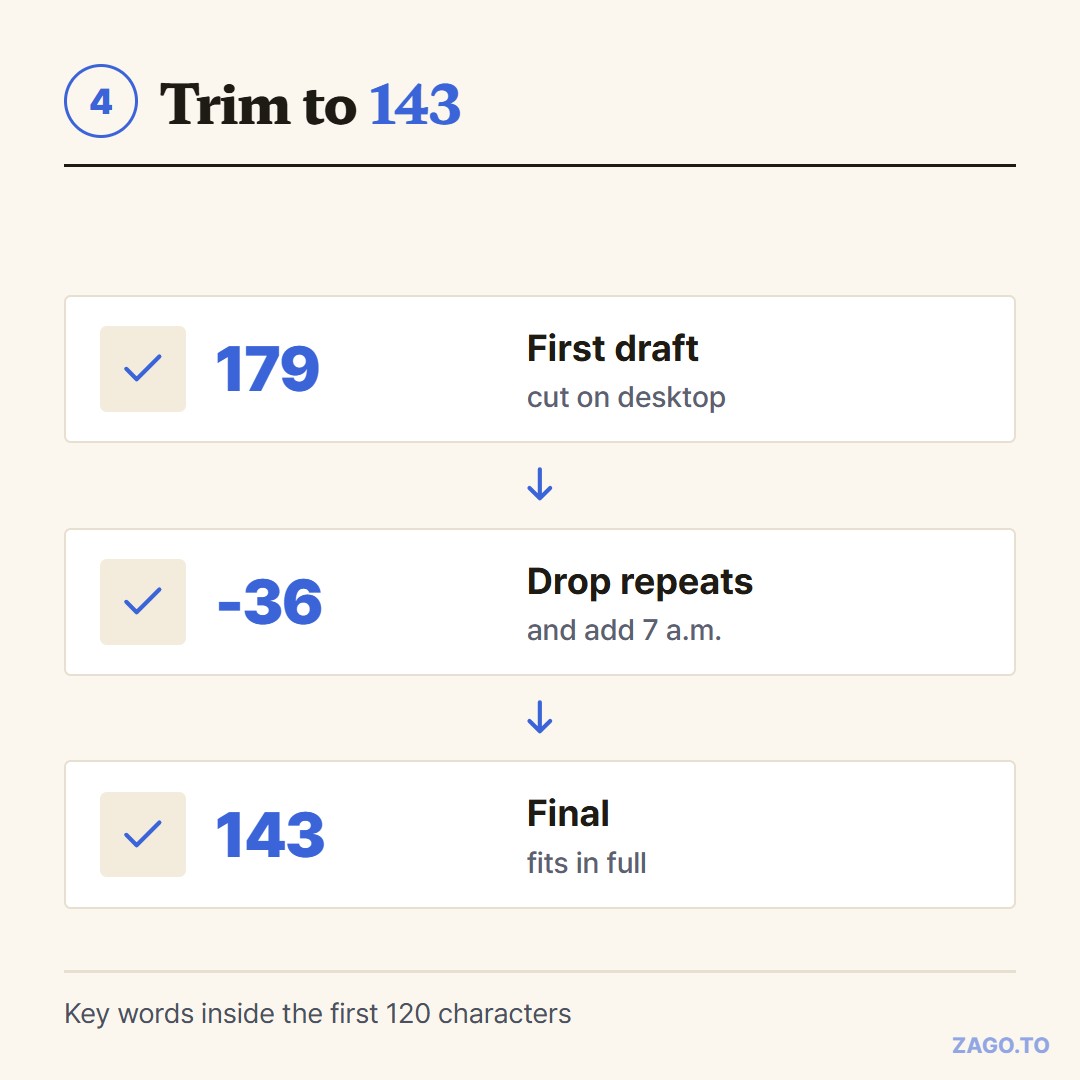
▲ Shorter, and more specific at the same time
Going the other way matters too.
A 46-character description like "Fresh sourdough bread baked daily in Portland." leaves most of the space unused. Google is more likely to replace a thin description with a line from the page.
5. Google may not use your description at all
This is the part most length guides skip. Google decides, query by query, whether to show your meta description or to pull a different passage from the page.
Its documentation says it uses the meta description when it gives a better summary than the page content would.
Independent studies by SEO software companies have found Google showing its own text for a large share of results.
What that means for length:
- A clear, specific description that matches what people search for is more likely to be shown as written
- A description stuffed with keywords is more likely to be replaced
- Every page should have its own description. Copying one across a site invites rewrites
To be plain about it, the meta description is not a ranking factor. Google has said so for years. Its job is to earn the click once you already appear, not to move you up the page.
6. A checker in your browser, and what it cannot tell you
Counting 150 characters by eye is not realistic. Paste the draft into a counter and watch the number.
The Word Counter on ZAGO.TO shows characters with spaces, characters without spaces and words as you type.
The draft autosaves on your device while you trim it, and it works in a phone browser with no account.
Use the "with spaces" number. Search engines count the spaces, and so does every length range in this guide.
To be straight about its limits: it counts characters, not pixels. It will not warn you that a line of capitals is wider than it looks.
A dedicated SERP preview tool, many of which are free, shows the pixel cut. The ZAGO.TO counter is the fast first look before you paste the text into your site.
The same width problem shows up on other platforms.
For YouTube, see YouTube title character limit and where the mobile cut lands.
For X, SMS and Instagram in one table, see character counter limits for X, SMS and Meta.
Before you publish the description
- 120 to 160 characters with spaces, aiming for about 150
- The main answer or product in the first 120 characters
- Sentence case, no all-caps words eating width
- Different on every page, written for the person searching
- Read once as a stranger: would you click this?
Paste it into the Word Counter for the character count, and use a snippet preview if you want to see the exact pixel cut.
Other tools: QR Code Generator · Days Until
 Days until Christmas
 Word Counter
 Age Calculator
 Wheel Spinner