How to find your Phantom wallet address, and why the app shows you more than one
2026-10-22
This post contains affiliate links. As an Amazon Associate, ZAGO.TO earns from qualifying purchases.
Which of the addresses in Phantom is the one the exchange wants?
That is the question hiding inside how to find phantom wallet address, because the answer is never just one string.
One Phantom account holds a Solana address, an Ethereum style address, a Bitcoin address and more. Only one of them matches the network you are about to send on.
Here is where each one is, how to tell them apart, and the checks before the paste.
1. Where the address is, on the phone and in the extension
▲ The wallet is on the phone and the withdrawal form is on the laptop
Mobile app. Open Phantom and tap the account name at the top of the home screen. A panel lists your accounts, and each line has a copy icon next to the shortened address.
The fuller view is behind Receive, the arrow-down button on the home screen. It shows a QR code and a list of networks, and each network has its own address with its own copy button.
Browser extension. Click the account name at the top of the window. The address copies, and a small confirmation appears. The Receive button opens the same network list as the phone.
More than one account. Phantom can hold several accounts, each with its own full set of addresses.
Check which account is selected before you copy anything. The name at the top is the one you are looking at.
2. Solana, Ethereum, Bitcoin: how to tell which you copied
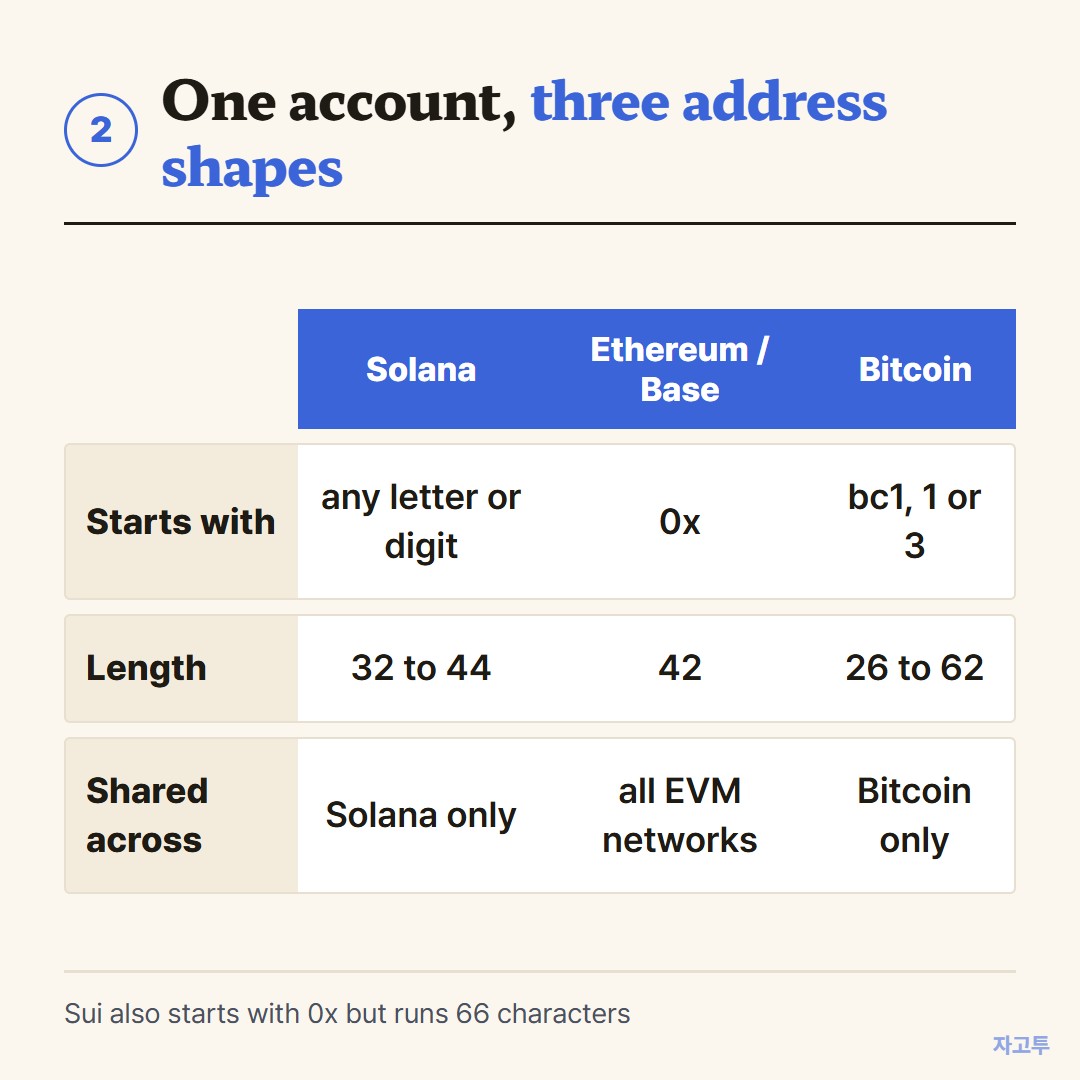
▲ Length and the first characters tell you the network before you read any label
Phantom started as a Solana wallet and now holds several chains. The addresses look nothing alike, which is useful.
- Solana: a run of 32 to 44 letters and numbers, no prefix, like 7xKX…9FqR. This is the phantom wallet solana address most people are after.
- Ethereum, Polygon, Base: one address starting with 0x, 42 characters long. Phantom shows it once under each EVM network, but it is the same string.
- Bitcoin: starts with bc1 or a 1 or 3. Phantom may show more than one format here, chosen by address type.
- Sui: also starts with 0x but is longer, 66 characters. Do not mix it up with the Ethereum one.
So how to find the EVM address on Phantom wallet is the same move as the Solana one. Open Receive and pick Ethereum, Polygon or Base, and the 0x line is it.
The same one-address-many-networks idea in MetaMask, and the network choice that goes with it, is in How to copy your MetaMask address.
3. The network decides which address, and two things people look up
▲ The network picker on the exchange side is where Phantom users slip
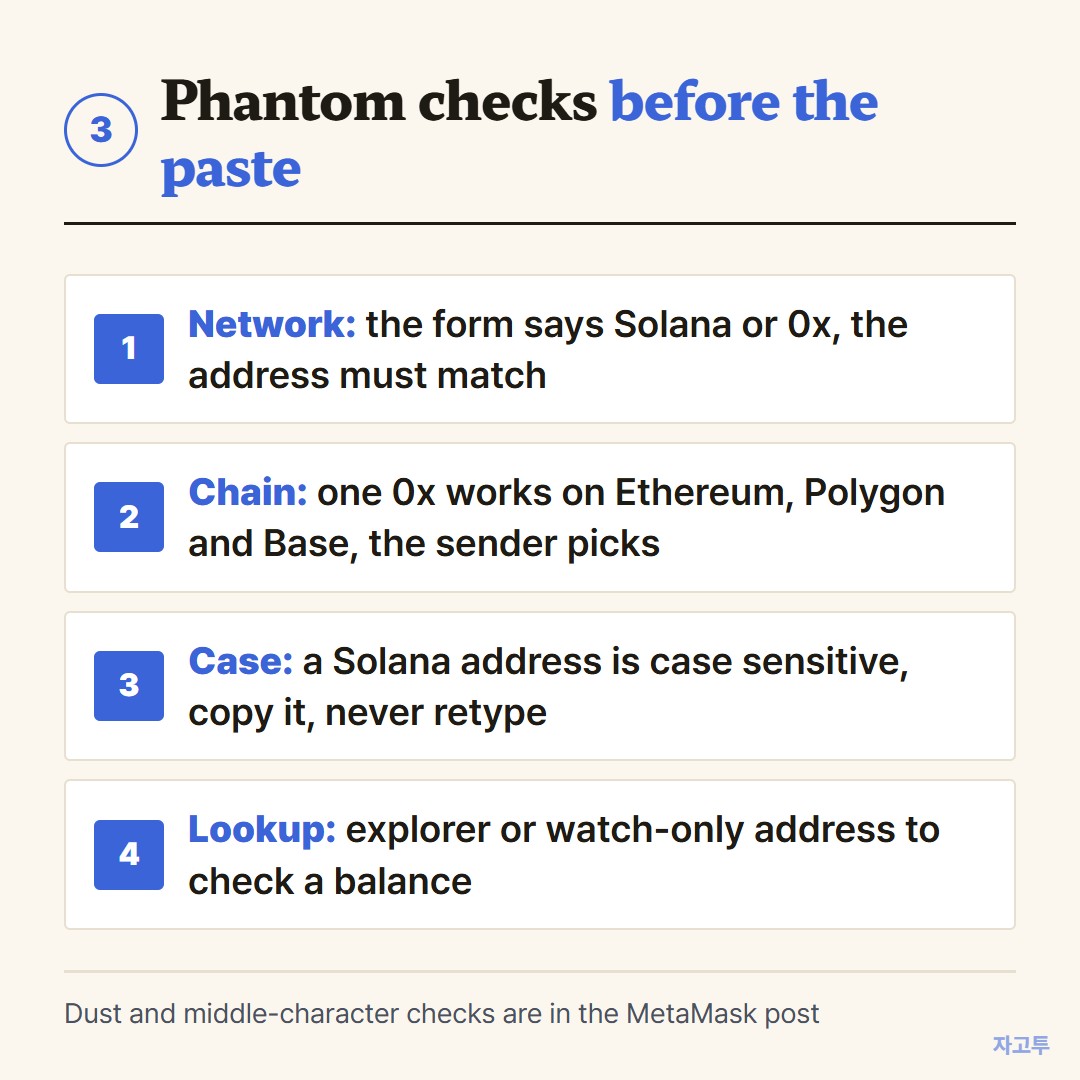
The form names the network, and the network names the address. A withdrawal form that says Solana wants the Solana address. One that says ERC20, Polygon or Base wants the 0x one.
Paste the wrong shape and the form rejects it, which is the good outcome.
The quieter mistake happens inside the 0x family. The exchange accepts the address on Ethereum, Polygon and Base alike, so the coins land on whichever chain you picked in that dropdown.
Phantom shows every chain it holds, so the question is always which one the sender chose. Switch the network view in Phantom to that chain and the balance appears.
Phantom wallet address lookup. Any Solana address can be pasted into a Solana explorer to see its balance and history, yours or anyone's.
Inside Phantom, the add account menu also offers a watch-only address, which shows an address's holdings without any key to it.
Upper and lower case. A Solana address is case sensitive, so a retyped one with a single capital changed is a different address. Copy it, never type it.
The dust-transfer and middle-characters checks apply to every wallet, Phantom included.
They are listed once in How to copy your MetaMask address.
Scanning the QR code under Receive skips copying entirely when the sending device has a camera. When to scan and when to paste is in Wallet address QR code.
4. When the wallet is on the phone and the form is on the laptop
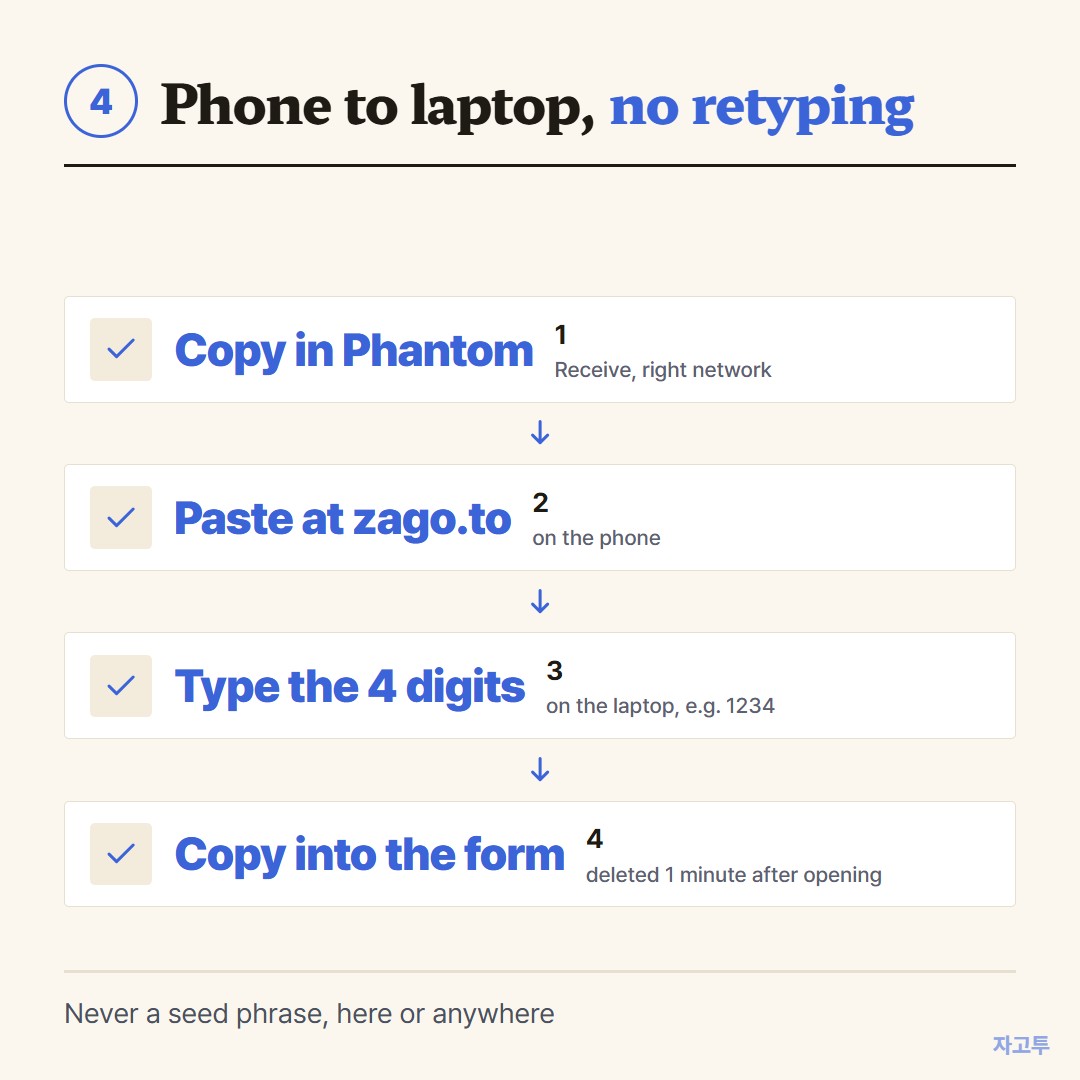
▲ No retyping, no account, and the address is gone a minute later
Phantom lives on the phone for most people, and the exchange is a tab on a laptop. There is no shared clipboard between the two.
A laptop webcam pointed at a phone screen rarely reads a QR code cleanly either.
ZAGO.TO takes the address as text. Copy it from Receive, open zago.to in the phone's browser, paste, and the page hands back a 4-digit code such as 1234.
Type those digits at zago.to on the laptop and the address appears, ready to copy into the withdrawal form. Nothing is installed and neither side signs in.
The code grows to five digits only when every four-digit code is taken.
One minute after the laptop opens it, the text is gone, and it also goes after one minute if nobody opens it. A second opening is not possible, so have the form on screen before typing the digits.
What ZAGO.TO cannot do belongs here too. It carries text only, up to 10,000 characters. In-browser encryption is not built yet, so the text sits readable on our server for that minute.
A receiving address is public by design, so that is fine. A seed phrase or private key must never travel this way or any other, and Phantom never asks for either one to show you an address.
Both devices yours and on the same account? A cloud note does the same job. The four digits are for the laptop that is not signed in to anything of yours.
One-line answer
Open Receive in Phantom, pick the network the form names, copy that address, and move it to the laptop as text, four digits on ZAGO.TO, then read the middle of it once before you confirm.
 Days until Christmas
 Word Counter
 Age Calculator
 Wheel Spinner