Does Apple TV have a web browser? What works instead of Safari
2026-10-20
This post contains affiliate links. As an Amazon Associate, ZAGO.TO earns from qualifying purchases.
Apple TV has an app for almost everything, except the open web.
So the honest answer to does Apple TV have a web browser is no. There is no Safari on tvOS, and Apple does not give app makers the web view they would need to build a real one.
That does not mean the page you want can never reach the big screen. It means the browser has to live on another device. Here are the three routes that work, and the one people waste an evening on.
1. Why the search for a browser app ends in frustration
▲ The page is on the phone, the screen is across the room
Search the App Store on your Apple TV for "browser" and a few apps do come up. Read the reviews before you pay.
Because tvOS has no public web view, these apps rely on workarounds. Pages can load slowly, look like a phone layout stretched to a TV, or skip video and logins altogether.
Older guides with millions of views show a different trick: installing a browser from a computer onto an Apple TV.
Those methods depended on old tvOS versions and developer tools. On a current Apple TV, expect them not to work.
2. Three routes that do work
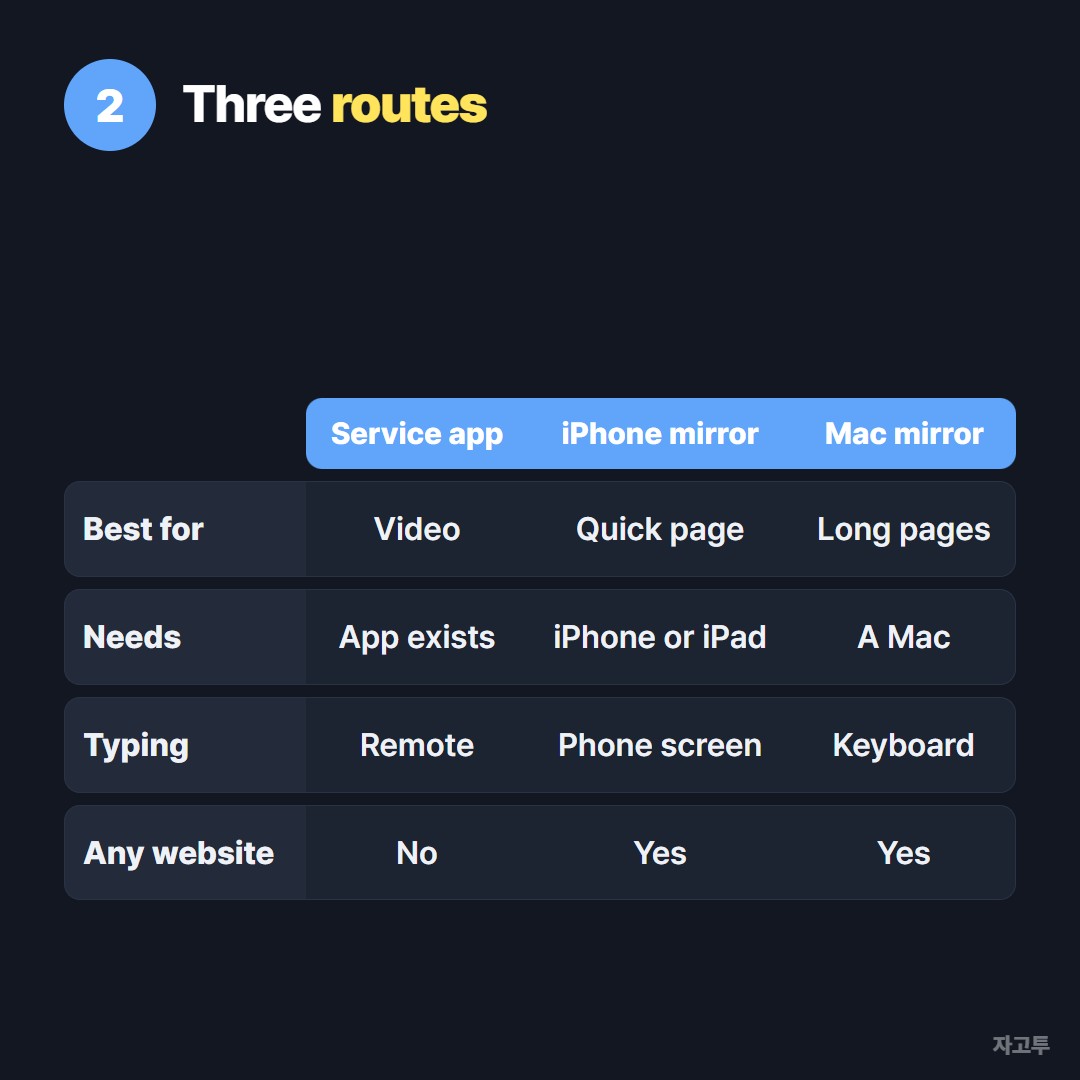
▲ Pick by what the page is for, not by which sounds simplest
Use the service's own app. If the website is YouTube, a streaming service, a sports league or a news channel, its tvOS app will almost always beat any browser. Search the App Store first.
Mirror from an iPhone or iPad. Open the page in Safari on the phone.
Open Control Center, tap Screen Mirroring, and choose your Apple TV. The whole phone screen appears on the TV, and the phone becomes your mouse and keyboard.
Mirror from a Mac. On a Mac, open Control Center, choose Screen Mirroring, then the Apple TV.
A laptop screen fits a TV better than a phone, so this is the best way to read a long page or show a slide deck.
Some streaming sites show a black screen while mirroring. That is the site protecting its video, not a fault in your Apple TV. Use the app instead.
3. AirPlay a website step by step
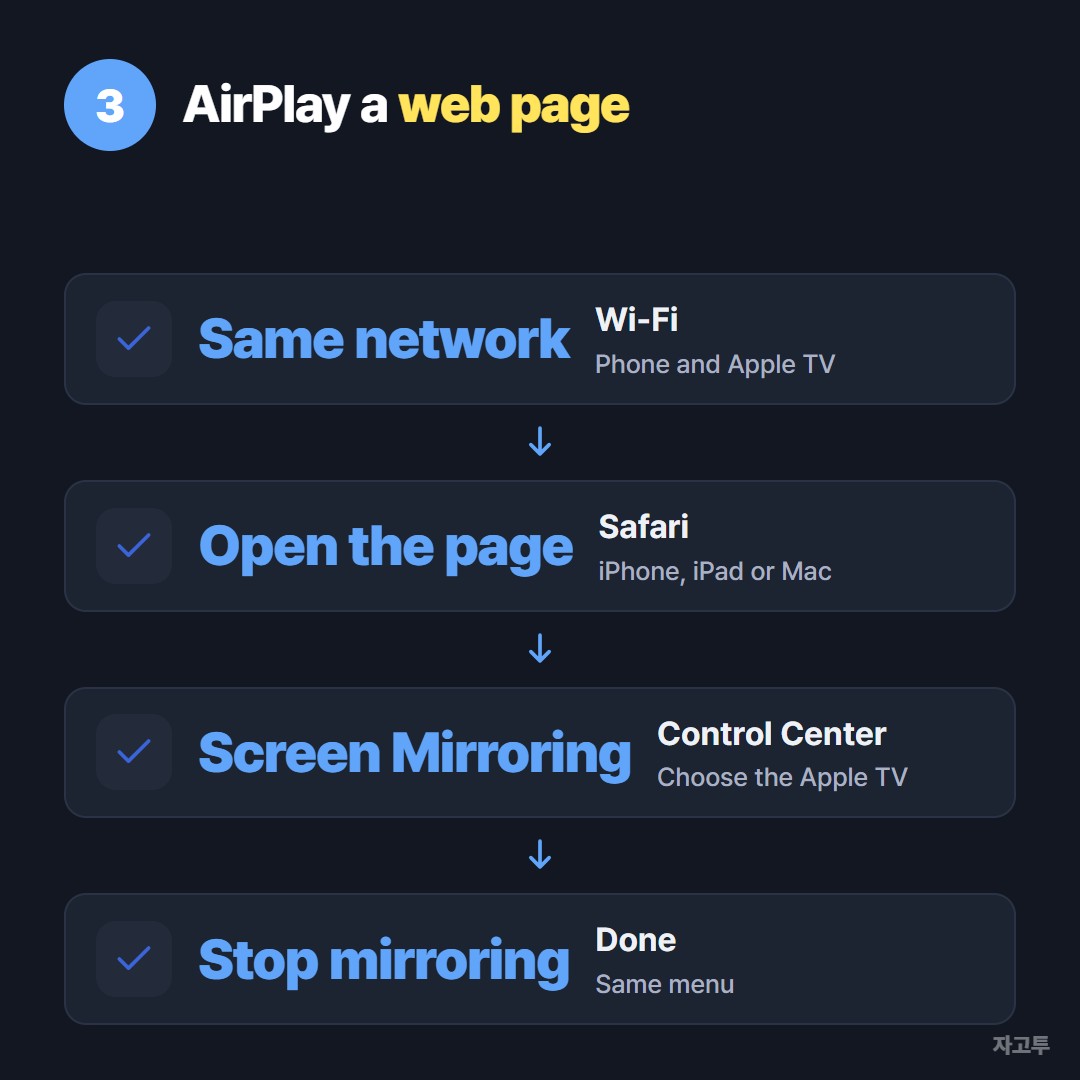
▲ Same Wi-Fi first, then four taps
- Put both on the same Wi-Fi. Mirroring looks for the Apple TV on your home network.
- Open the page in Safari on the iPhone, iPad or Mac.
- Open Screen Mirroring in Control Center and choose the Apple TV.
- Turn the phone sideways for wide pages, and stop mirroring from the same menu when you are done.
If the Apple TV does not show up in the list, restart both devices and check that AirPlay is allowed in the Apple TV's settings.
Other TVs handle this very differently. Many have a built-in browser, as covered in how to open a website on a Samsung TV.
A phone can push a link to them in other ways, as shown in how to send a link from your phone to a TV.
4. When the link is on a computer that is not Apple
Mirroring needs an Apple device. If the link you want to show is in a chat on a Windows laptop, or a friend has it on an Android phone, it first has to reach your iPhone.
Email or a chat works.
For one link, ZAGO.TO is shorter: paste the link at zago.to on the laptop, get a 4-digit code, and type the code at zago.to in Safari on your iPhone. Then mirror as above.
To be clear about the limits. ZAGO.TO cannot open anything on the Apple TV itself, because there is no browser there to open it in.
It carries text only, up to 10,000 characters, and no files or photos. The link is deleted 1 minute after it is opened, or after 1 minute if nobody opens it, and it cannot be opened again.
Our server can read what you send, since in-browser encryption is not built yet. A recipe or a video link is fine, a password is not.
Common questions
Is there a free web browser for Apple TV? A few App Store apps call themselves browsers.
Because of tvOS limits, they handle many sites poorly. Mirroring from an iPhone is free and works with any page.
Can I get Safari on Apple TV 4K? No. The 4K model runs the same tvOS without Safari.
Can I type a web address with the Siri Remote? Only into apps that have a search box. For long text, the keyboard in the Apple TV Remote on your iPhone is faster.