Can you message yourself on Discord? Not directly, so here is the one-person server trick
2026-10-13
This post contains affiliate links. As an Amazon Associate, ZAGO.TO earns from qualifying purchases.

Can you message yourself on Discord the way you can on Slack or WhatsApp? Not directly. There is no chat with your own name in the DM list.
The usual fix is a private server with one member: you. It takes about a minute, works on the phone and the computer, and keeps your links and notes out of everyone else's view.
1. Why there is no "message yourself" on Discord

▲ The DM list only shows other people, so the note needs a home of its own
Discord's direct messages are built around friends. You open a DM by picking another person, and your own account is not on that list.
That surprises people coming from Slack, where a self DM sits at the top of the sidebar.
If you came here from there, How to DM yourself on Slack covers that side.
On Discord, the closest thing is a server that only you belong to. It behaves like a notebook with channels.
2. How to make a one-person server
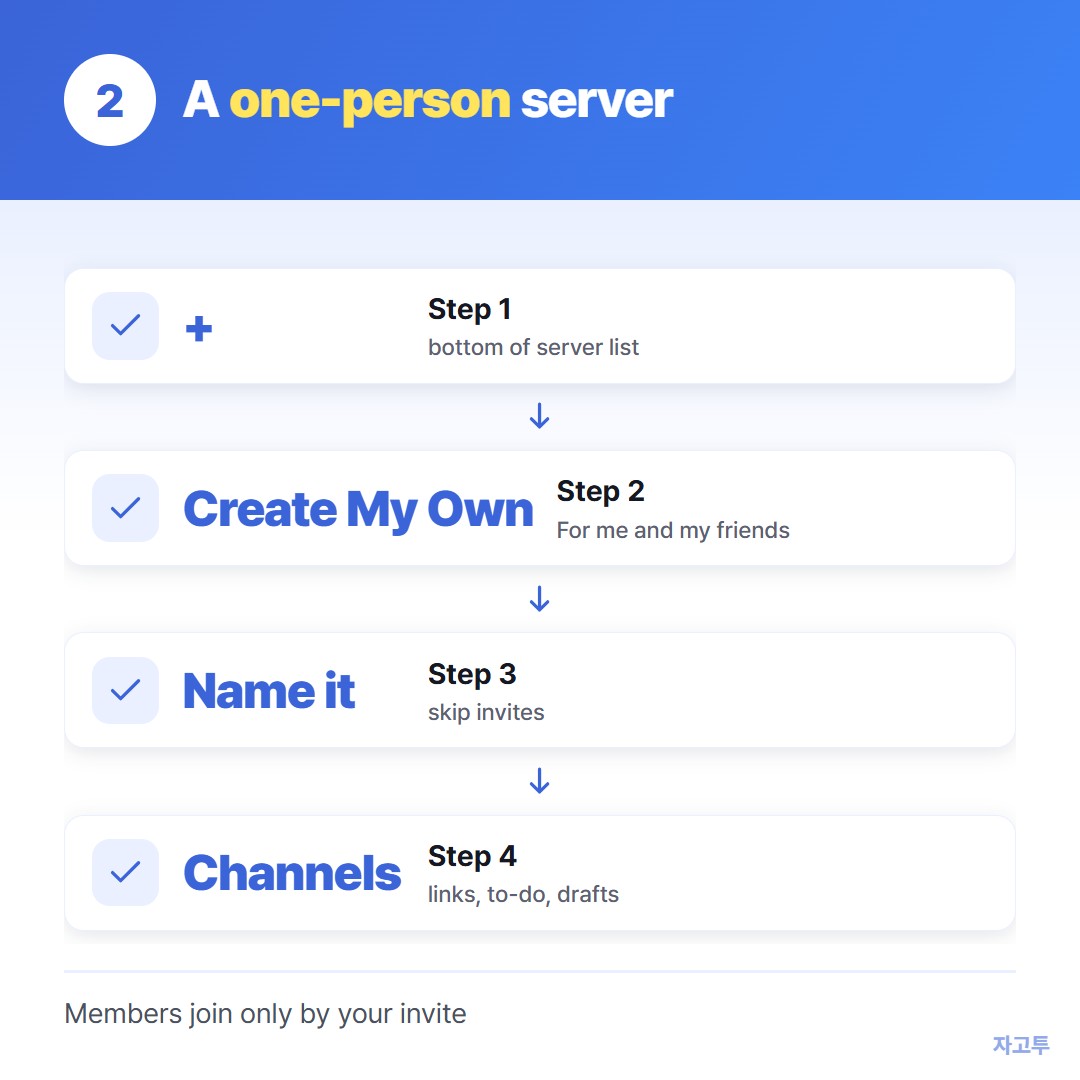
▲ The same server shows up on every device where you are signed in
- Click or tap the + button at the bottom of the server list on the left.
- Choose Create My Own, then For me and my friends.
- Give it a plain name like "Notes" and skip the invite step.
- Rename the default channel, or add a few: links, to-do, drafts.
Other people only join if you invite them.
On your phone it appears in the same server list, so a link you drop on the computer is there when you open the app.
### Make it easier to find things later
Pin what you keep coming back to. Hover over a message, open the menu and choose Pin Message. The pin icon at the top of the channel lists them.
Use search with the channel filter. Typing a word in the search box finds old notes much faster than scrolling.
Mute the server. It is your own notes, so notification badges add noise rather than help.
3. What the private server is not good for
Do not treat it as a password vault. It is still a chat service. Anything you post stays until you delete it, on every device signed in to your account.
It is also no help on a computer where Discord is blocked. Plenty of workplaces and schools block it on their network.
Signing in to your personal account on a shared or work PC leaves a session behind if you forget to log out.
And it keeps everything. That is the point for notes, but for a code or a link you need once, it becomes clutter.
4. When the note only needs one trip
Some notes never need a home. You found a long link on the work computer and want it on your phone for the train. You need a paragraph from your laptop in a form on your tablet.
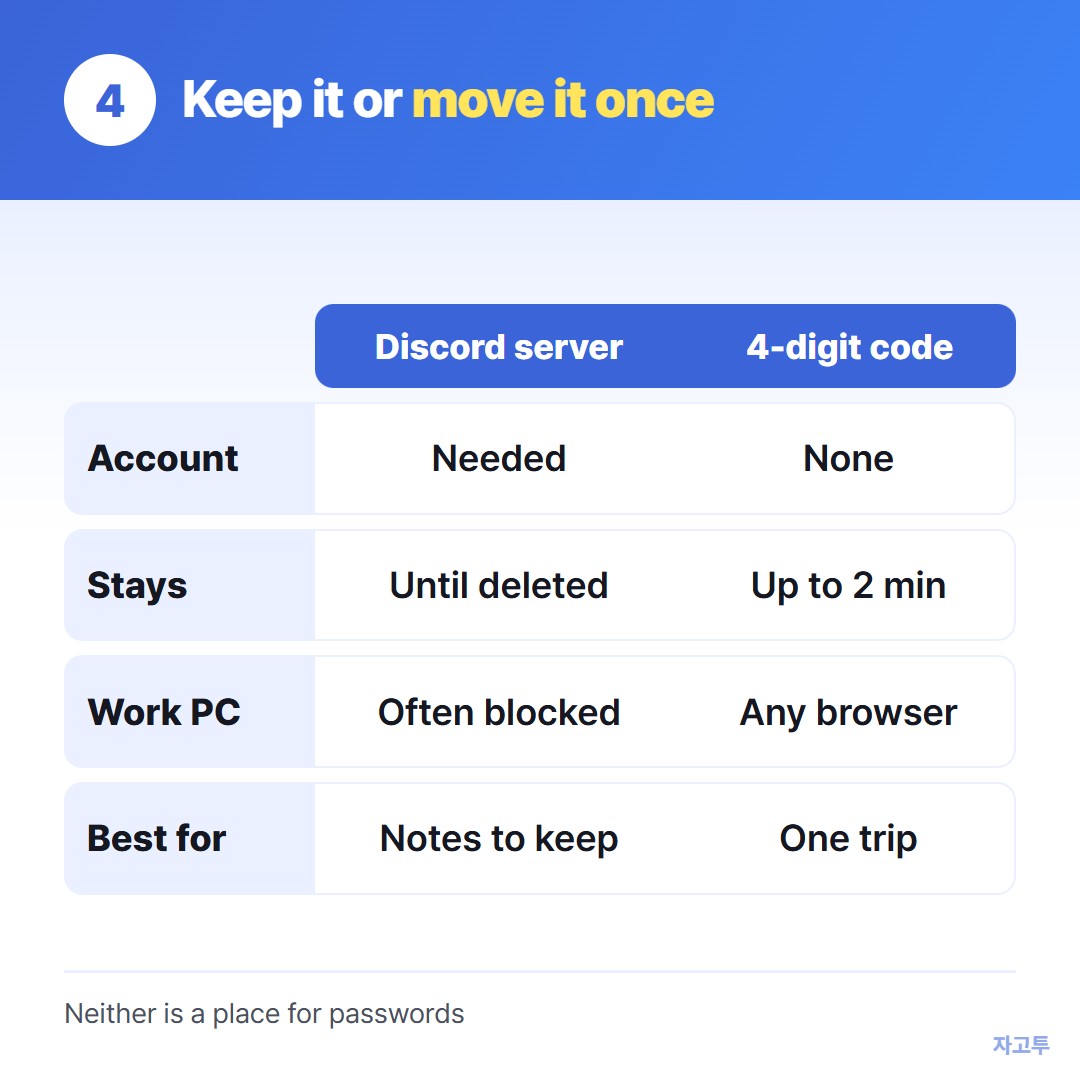
▲ One keeps notes, the other moves a line of text once
For that one trip, ZAGO.TO is shorter. Paste the text at zago.to, get a 4-digit code, open the same site on the other device and type the code.
No account, so it works on a computer where Discord is blocked.
The limits are real. It carries text only, up to 10,000 characters. Unopened text is deleted after 1 minute, and opened text 1 minute after opening, so you cannot go back to it next week.
There is no in-browser encryption yet, which means our server can read what you send. Keep passwords and keys out of it, the same way you would keep them out of a chat.
Quick checklist
- Keeping it: a one-person Discord server, with pins for the important ones
- Finding it: search inside that server instead of scrolling
- Blocked at work: use a browser route that needs no sign-in, such as ZAGO.TO
- Secrets: a password manager, not a chat and not a code