VMware copy paste not working? Go through it in this order
2026-10-08
This post contains affiliate links. As an Amazon Associate, ZAGO.TO earns from qualifying purchases.
Why does Ctrl+V into the guest do nothing, when it worked yesterday or never worked at all?
When VMware copy paste is not working, the cause is usually one of four things, and they sit in a fixed order.
The tools inside the guest, the isolation setting on the VM, a stuck background process, and on Linux, the desktop session.
Checking them in that order saves you from reinstalling things that were never broken.
1. Is VMware Tools actually running?
▲ The VM window looks fine. The clipboard bridge lives inside the guest
The clipboard does not cross by itself. A small program inside the guest carries it, and without it the host and the VM simply cannot hear each other.
Windows guest. Look for the VMware Tools icon in the system tray, or check that the VMware Tools service is running in Services.
If it is missing, use VM, then Install VMware Tools in Workstation or Player. If it is there but copying still fails, run the installer again and choose Repair.
Linux guest. Most distributions ship open-vm-tools. The catch is that the package for a desktop is a separate one.
On Ubuntu, Debian and Kali, install `open-vm-tools-desktop` with your package manager, then reboot.
Having only open-vm-tools without the desktop part is the most common reason clipboard sharing never starts.
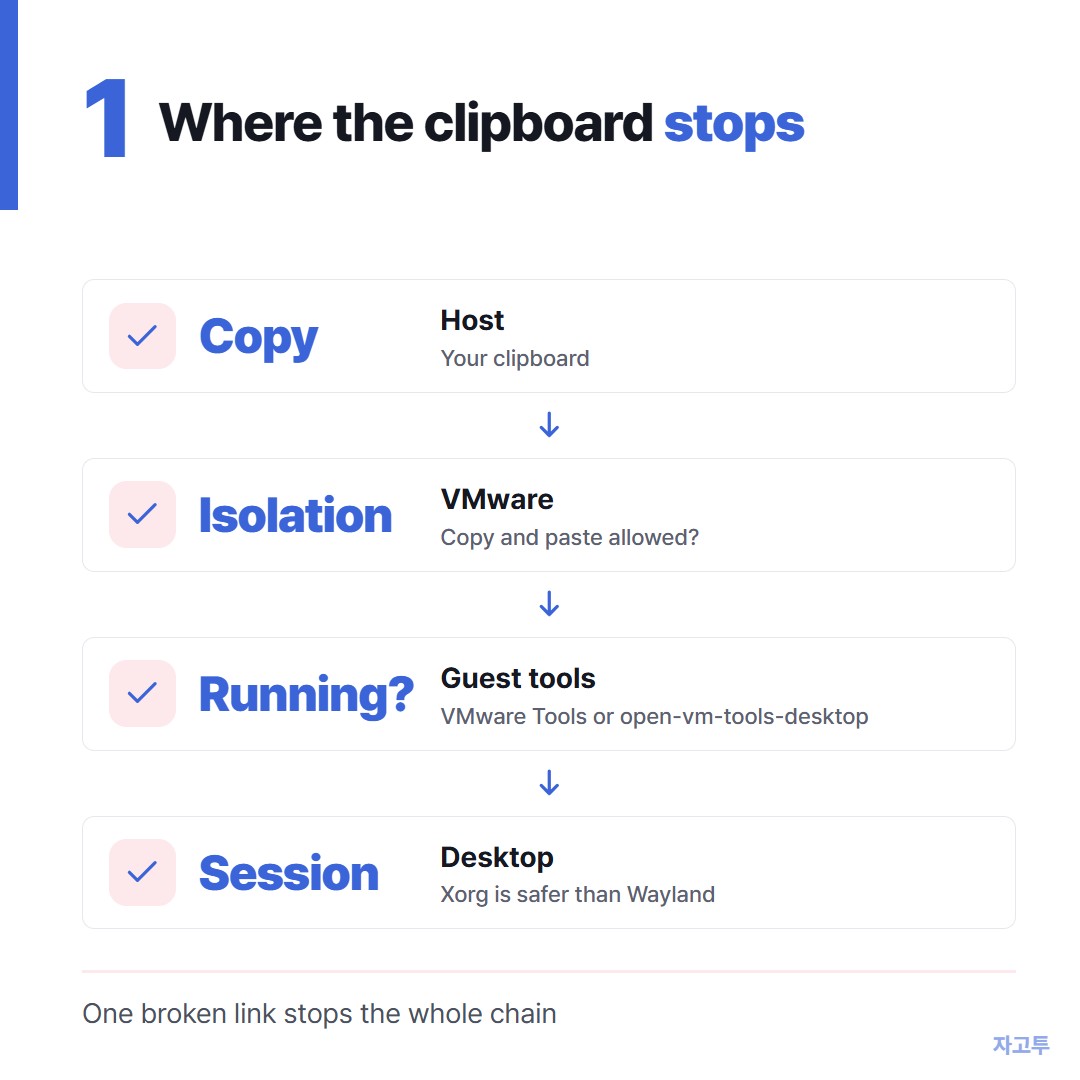
▲ Four links in the chain. One broken link is enough
2. Guest Isolation and the settings behind it
Open the VM's settings, go to Options, then Guest Isolation. Enable copy and paste, and enable drag and drop if you want that too.
If those boxes are greyed out, it usually means VMware Tools is not running in the guest yet. Go back to the first step.
On ESXi or vSphere the story is different. Copy and paste through the remote console is turned off by default there, for security reasons.
An administrator can allow it with advanced settings on the VM, `isolation.tools.copy.disable` and `isolation.tools.paste.disable` set to false.
On a work server, ask before changing them. The default exists on purpose.
3. VMware copy paste not working since yesterday
This is the version that drives people up the wall. Nothing changed, and suddenly paste is dead.
- Restart the guest. The helper process that handles the clipboard can hang after sleep or a long session. A reboot clears it more reliably than anything else.
- Check a host clipboard tool. Clipboard managers or remote desktop software on the host sometimes hold the clipboard and confuse the hand-off.
- Try plain text. Very large copies or rich content from some apps fail where a short line of plain text goes through.
4. The Wayland catch on Linux
On newer Ubuntu and Fedora desktops, the default login session is often Wayland. Clipboard sharing with VMware has been less reliable there than on Xorg.
If everything above is in place and paste still fails, log out. On the sign-in screen, use the gear icon to pick the Xorg session, for example Ubuntu on Xorg, and sign in again.
In a terminal, remember Ctrl+Shift+V. Plain Ctrl+V failing in a Linux terminal is not always a VMware problem.
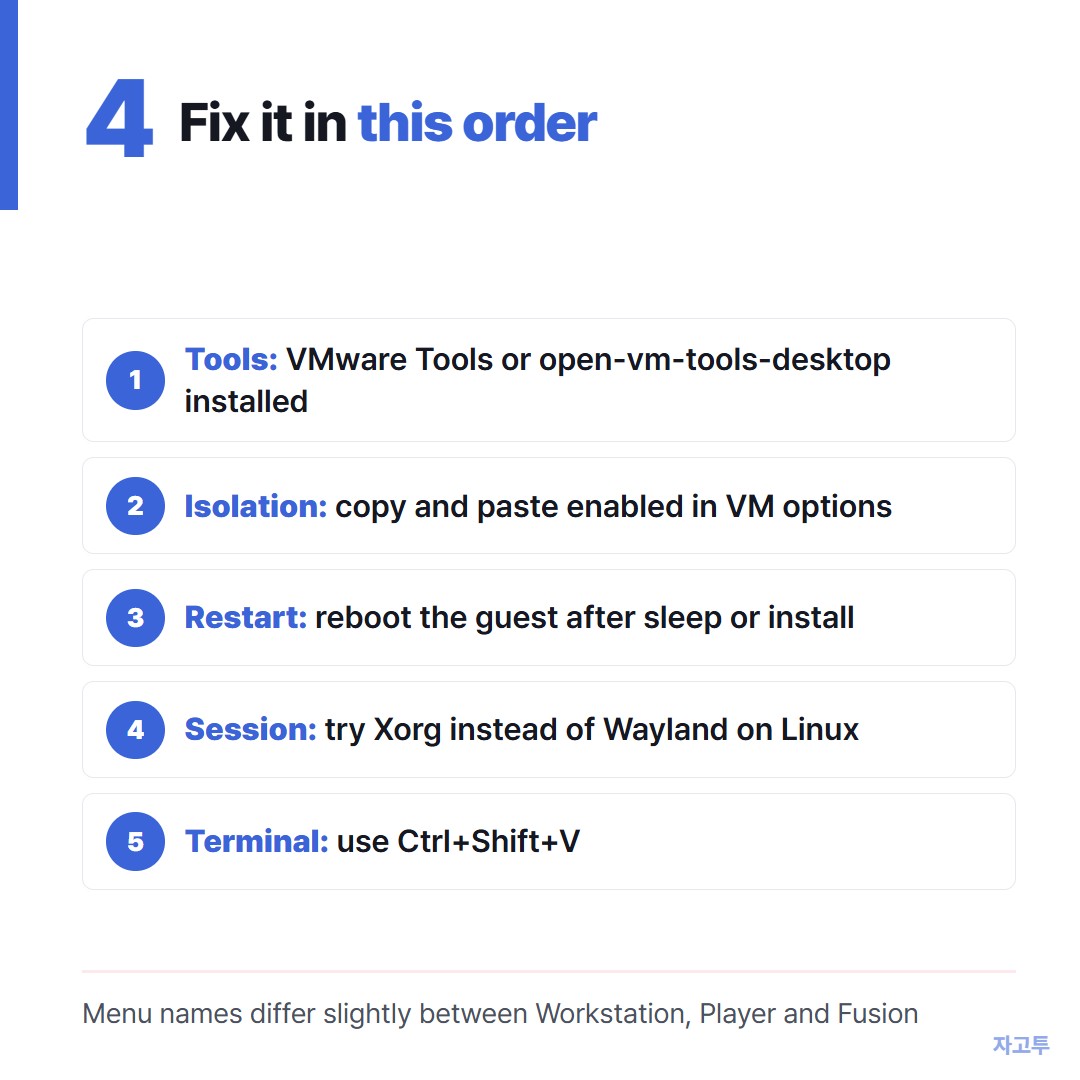
▲ Most people are fixed by step one or step two
While you are still fixing it
Sometimes you need one command inside the VM now, and the fix can wait until lunch.
If the guest has a browser and internet access, ZAGO.TO moves a short piece of text with four digits. Paste on the host, get a 4-digit code, open zago.to inside the VM and type the code.
It is text only, up to 10,000 characters. If nobody opens it, it is deleted after 1 minute, and once opened it is shown for 1 minute and then deleted.
You cannot open it a second time, and it will not carry files.
Do not move passwords, SSH private keys or API tokens this way. There is no in-browser encryption yet, so our server can read the text while it is held.
What our server can see explains that plainly, and What never to move lists the rest.
For files, VMware's shared folders or drag and drop, once the tools work, are the right tool.
Quick answers
Why is Install VMware Tools greyed out? Often because the tools are already installed, or the VM has no virtual CD drive to mount the installer on. On Linux, use the package manager instead.
Does this apply to VMware Fusion on a Mac? The same idea applies. The guest needs VMware Tools, and Fusion has its own isolation settings in the VM's sharing options.
Do I need to reboot after installing open-vm-tools-desktop? Yes, or at least log out and back in. The clipboard helper starts with the desktop session.